


Most agencies don't have a creative library. They have a Google Drive with 40,000 files, a Dropbox someone set up in 2019, and a folder structure that made sense to one person who left two years ago. When a strategist needs the winning hero video from the Q3 campaign, they either message three people or just rebuild it from scratch.
The cost is invisible but constant. Designers recreate assets that already exist. Media buyers relaunch creative nobody realized had already fatigued. Account leads promise clients "we'll pull the top performers from last year" and then spend two hours failing to find them. None of this shows up on a P&L, but it shows up in blown hours and slower turnaround every single week.
This post is narrow on purpose. It's about the schema, the ingestion rules, and the migration plan that turn a pile of files into something people can actually search. No broad DAM philosophy — just the fields, the automation logic, and the checklist to get from mess to functional.
Why creative libraries decay in the first place
The decay pattern is almost always the same, and it isn't laziness. It's that naming and tagging happen at the worst possible moment — the end of a project, when everyone's exhausted and already thinking about the next launch.
In practice, here's how it plays out. A campaign wraps. Final files get dropped into a folder named after the client and a date. Nobody adds context about which variant won, what platform it ran on, or which offer it was testing. Six months later that folder is basically archaeological. You can open the files but you can't answer the only questions that matter: did this work, and can I reuse it?
A second driver is that every person invents their own naming convention. One designer names files NikeSummerv3FINALFINAL. Another uses nike-summer-hero-1080x1080. A third just leaves it as Export_04.mp4. Multiply that across a 15-person team and three years, and search becomes hopeless because there's no shared vocabulary to search against.
The core insight is that creative library governance isn't a filing problem — it's a metadata capture problem. If the right information isn't attached at ingestion, no folder structure on earth will save you later. Folders are a single hierarchy. Real reuse needs many dimensions — platform, format, offer, performance, client, rights status — and you can only slice across those dimensions with metadata, not nesting.
The metadata schema: fields that actually get used
The mistake agencies make with schemas is building a 40-field monster that nobody fills out. Every optional field is a field that will be blank 90% of the time. The trick is separating required-at-ingestion fields from enriched-later fields, and keeping the required set short enough that it doesn't feel like homework.
Eliminate marketing chaos with streamlined campaign control.
Digmaly lets you plan, execute, and track every campaign effortlessly.
- Unified campaign management
- Real-time client reporting
- Collaborative team workflows
No credit card required
Below is a schema that holds up in practice. The controlled-vocabulary fields matter most — those are the ones you'll search and filter on, so they can't be free text.
| Field | Type | Required? | Example values | Why it earns its place |
|---|---|---|---|---|
client | Controlled list | Yes | Acme, Northbay, RiverCo | Every search starts here |
asset_type | Controlled list | Yes | static, video, carousel, UGC, script | Filters out 80% of noise instantly |
platform | Controlled list (multi) | Yes | Meta, TikTok, YouTube, Google, email | Reuse is platform-specific |
aspect_ratio | Controlled list | Yes | 1:1, 9:16, 16:9, 4:5 | Prevents "wrong size" reuse failures |
campaign_id | Reference | Yes | Q3-2024-PROSPECT | Links asset to context and results |
offer_angle | Controlled list | No | discount, social-proof, urgency, education | The single most useful reuse filter |
performance_tier | Controlled list | Enriched later | top, mid, underperformer, untested | Turns library into a "what won" archive |
rights_expiry | Date | Conditional | 2025-11-30 | Talent/stock usage windows |
source_files | Reference | No | link to editable PSD/AE project | Kills the "we lost the working file" problem |
status | Controlled list | Yes | active, archived, expired, do-not-use | Prevents relaunching killed creative |
Two fields punch above their weight. offerangle is what lets a strategist say "show me every social-proof static we've run for finance clients" — that's the kind of query that actually drives reuse decisions. And performancetier, enriched after a campaign closes, is what converts your library from storage into a decision tool. Connecting that back to real results pairs naturally with how you should be running A/B testing and reusable briefs — winning variants should flow straight into the library tagged as top-tier rather than getting buried in a campaign folder nobody revisits.
The do-not-use status inside the status field is underrated. Legal issues, creative a client hated, expired talent rights — you need a way to mark something as "still here for the record, but never touch this again." Without it, someone will eventually relaunch it.
Ingestion rules: capture metadata when the file arrives, not later
The moment of ingestion is the only reliable moment to capture metadata. Everything you defer gets abandoned. So the governance work is really about making ingestion frictionless and partially automatic.
-
Auto-derive what the file already knows. Aspect ratio, dimensions, file type, duration, and creation date should be read from the file, never typed by a human. This is trivial to script and removes several fields from anyone's plate immediately.
-
Infer from the upload path. If assets are uploaded into a campaign-scoped intake location,
clientandcampaign_idcan be pre-filled from context. The uploader confirms rather than enters from scratch. -
Force the short required set. Block the upload from completing until
assettype,platform, andofferangleare chosen from dropdowns. Three clicks, not a form. -
Validate against controlled vocabularies. Reject free-text entries for any controlled field. If someone types "insta," the system maps it to "Meta" or refuses it. This is what keeps search working two or three years out.
-
Queue enrichment.
performance_tiergets flagged as "pending" and revisited when the campaign closes, ideally pulled from your reporting layer rather than estimated from memory.
This is where AI-assisted ingestion earns its keep without being a gimmick. Auto-tagging models can suggest offerangle and assettype from the creative itself — read on-image text, detect a discount callout, recognize a talking-head UGC format — and pre-fill dropdowns for a human to confirm. The human stays in the loop; the automation just removes the blank-page problem. Suggestion-plus-confirm tends to get you 80–90% tagging compliance versus the 20–30% you get from asking people to fill out forms on their own.
One rule worth enforcing hard: no asset enters the library without a campaign_id. Orphaned assets with no campaign link are exactly the files that become unsearchable later, because they have no context to inherit. If a file has no campaign, it lives in a "staging" bucket, not the library.
Archival policies: keeping the library fast and honest
Libraries rot in a second way — they get too big and too stale to be useful. If a search for "Meta 9:16 video" returns 600 results including everything from 2020, nobody trusts it. Archival isn't about deleting; it's about keeping the active surface relevant enough that people actually use it.
A workable tiering policy:
-
Active ran in the last ~12 months, or tagged
topperformer regardless of age. These show in default search results. -
Archived older than ~12 months and not a top performer. Still searchable, but filtered out by default.
-
Expired
rights_expiryhas passed. Auto-flagged, hidden from active search, and impossible to download without an explicit override. -
Cold storage anything untouched for 3+ years that isn't a proven winner. Moved to cheaper storage, out of the working index entirely.
The automation that makes this stick is date- and rights-driven, and it should run on a schedule without human involvement. An asset with a rights_expiry from last month shouldn't require someone to remember to pull it — the system checks daily and flips the status. This is the same discipline you'd apply to credential and access hygiene in ad ops — expiry-driven state changes shouldn't depend on someone's memory.
Agencies routinely let expired-rights creative sit downloadable, and eventually someone relaunches a spot with talent whose usage window closed months ago. The invisible archival tax suddenly becomes a very visible legal one. A hard download-block on expired assets is cheap insurance.
It's also worth noting that archival tiers only stay honest if someone owns them. Even with automation handling the status flips, you want a named person doing a quarterly pass — checking that the top tier hasn't quietly filled up with two-year-old creative that nobody's actually pulling, and that cold storage isn't hiding assets that should be active again after a seasonal campaign restart.
The migration: getting from the graveyard to the schema
This is the part everyone dreads, and the reason most agencies never actually fix their library. Migrating 40,000 files sounds like a quarter of lost productivity. It isn't — if you refuse to migrate everything.
The single biggest migration mistake is trying to clean the whole archive. Don't. Most of those files will never be touched again. Migrate what has a realistic chance of being reused and let the rest sit in a read-only "legacy" bucket you can search by filename if you're truly desperate.
Migration checklist
-
- [ ] Freeze the source. Lock the old drive to read-only during migration so nothing new lands in the mess mid-move.
-
- [ ] Inventory and dedupe. Script a scan that hashes files and flags exact duplicates. Agencies routinely carry 20–40% duplicate files. Kill them before you migrate.
-
- [ ] Define the migration cutoff. Only actively migrate assets from the last ~18–24 months plus any known top performers. Everything older goes to legacy cold storage.
-
- [ ] Map old paths to new metadata. Your folder names encode information —
ClientX/2024/Meta/Summeralready tells you client, year, and platform. Parse those into fields rather than re-tagging by hand. -
- [ ] Auto-derive technical fields (dimensions, ratio, duration, type) during the move.
-
- [ ] Run auto-tag suggestions on
assettypeandofferangle, flagged for human confirmation. -
- [ ] Backfill
performance_tierfrom historical reporting for anything you can match to a campaign. -
- [ ] Spot-check 5% by hand. Pull a random sample and verify tags are accurate before trusting the full batch.
-
- [ ] Publish the controlled vocabularies so the whole team is entering the same values going forward.
A migration script logic worth stealing
for each file in source: hash = computehash(file) if hash in seen: markduplicate(); continue meta = readtechnicalmetadata(file) # ratio, duration, type pathfields = parsefolderpath(file.path) # client, year, platform suggested = aitag(file) # assettype, offerangle record = merge(meta, pathfields, suggested) record.status = "needsreview" if confidencelow else "active" writeto_library(record)
The needs_review gate is the important line. Low-confidence records get queued for a human instead of silently entering the library with bad tags. That keeps trust in search high — and a library people don't trust is a library people stop using, which puts you right back at the graveyard.
Freeze the source to read-only during migration so new files don't land mid-move.
A simple visual of the migration workflow:
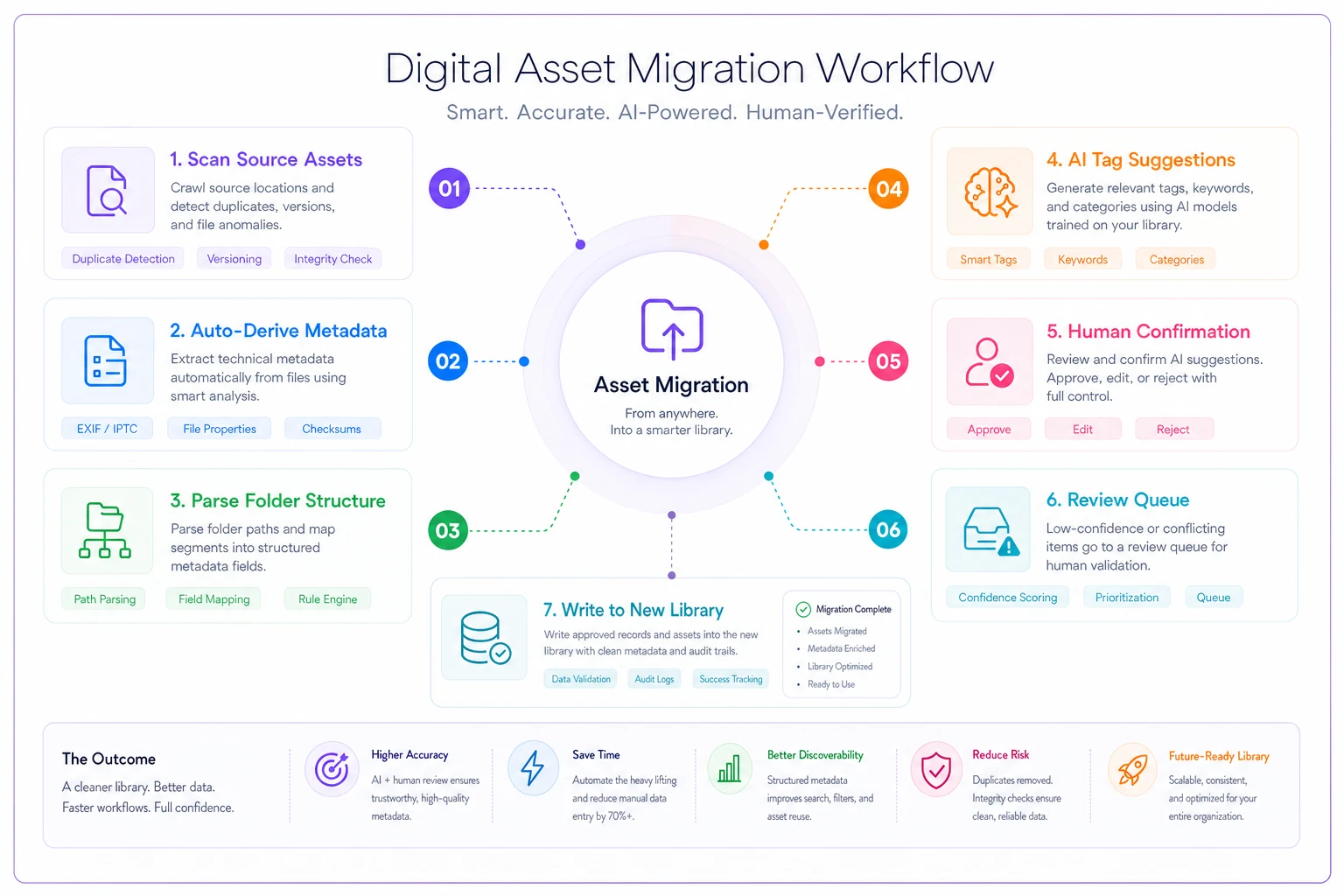
Use the script plus the review gate to keep high confidence in your migrated tags before relying on the library for day-to-day searches.
Real scenario: a 12-person performance shop
A mid-sized performance agency running paid social for around 20 e-commerce clients had roughly 28,000 creative files spread across Drive and Dropbox. Designers were rebuilding assets weekly because finding the original working files took longer than just remaking them. The team estimated somewhere between 6 and 8 hours a week lost to recreation and searching, just within the design pod.
They ran the migration selectively: about 9,000 files migrated (the last ~18 months plus flagged winners), the rest pushed to legacy cold storage. Deduplication alone removed close to 30% of the "active" set. Auto-derived technical fields plus path-parsing handled the bulk of tagging; humans confirmed offer_angle on the ambiguous ones.
The outcome wasn't dramatic on paper but genuinely different day-to-day. Finding an asset dropped from "message three people" to a filtered query returning results in under a minute. Designer recreation time fell by roughly half. And because winning creative was now tagged top and easy to surface, the media team started re-cutting proven angles instead of chasing net-new every cycle.
That last part matters more than it sounds. You can only refresh fast if you can find the winners fast — which connects directly to catching creative fatigue before it tanks performance. A well-tagged library and a fatigue monitoring process feed each other. One tells you what's wearing out, the other tells you what to pull as a replacement.
When this is worth it — and when it isn't
Governance this deliberate makes sense once you're past roughly 8–10 people, running multiple clients, and producing enough creative volume that people can no longer hold the archive in their heads. That's the threshold where informal knowledge breaks down and search becomes the real bottleneck.
It's a bad idea to over-engineer this if you're a three-person shop with two clients. You don't need a controlled vocabulary and an ingestion pipeline for 800 files — a clean folder structure and consistent naming will carry you fine. Building governance you don't need is just a different flavor of wasted time.
Nobody should attempt a full-archive migration either. Teams that try to tag everything back to 2019 stall out around week two and abandon the whole thing, leaving themselves worse off than when they started. Migrate the reusable slice, cold-store the rest, and enforce the schema going forward. The archive fixes itself over time once ingestion is disciplined — every new asset lands clean, and the old mess quietly ages into irrelevance.
The one thing to get right
If the schema and the migration feel like too much to take on at once, start with a single rule: nothing enters the library without assettype, platform, offerangle, and a campaign_id. Four fields, enforced at upload, mostly auto-suggested. That alone gets you a searchable library within a few months of normal production volume, without touching a single legacy file.
Everything else — the archival tiers, the rights automation, the performance enrichment — is refinement on top of that foundation. The graveyard exists because capture was optional. Make capture mandatory and nearly automatic, and the library becomes an actual asset instead of a place where assets go to disappear.
Everything else — the archival tiers, the rights automation, the performance enrichment — is refinement on top of that foundation. The graveyard exists because capture was optional. Make capture mandatory and nearly automatic, and the library becomes an actual asset instead of a place where assets go to disappear.
Ready to elevate your agency's performance?
Join 2,000+ agencies using Digmaly to save time, boost efficiency, and deliver superior client results.