


Creative fatigue kills more profitable campaigns than budget cuts or audience exhaustion combined. You launch a campaign, it's hitting every target—CTR looks solid, CPA is where you need it, client's happy with the results. Then around week four, something shifts. Performance doesn't crash, it just... slides. CTR drops a few points, costs edge up slightly, engagement gets a little weaker. Nobody catches it immediately because the decline is gradual. By the time someone notices during the next weekly review, you've burned through $3,000-4,000 in inefficient spend. The worst part? This pattern repeats across multiple accounts simultaneously while your team focuses on launching new campaigns. I've watched this exact scenario play out hundreds of times across different agencies. Creative fatigue operates on a completely different timeline than campaign failure—it's slow degradation, not sudden collapse.
The operational blindspot that costs agencies thousands monthly
Most agencies track creative performance at the wrong level. They monitor campaign metrics, check dashboards during weekly meetings, maybe set up basic alerts for spend anomalies. But creative fatigue happens at the asset level, not the campaign level.
Picture this: You're managing 12 active campaigns across 8 clients. Each campaign runs 3-5 creative variations. That's roughly 40-60 individual creative assets actively spending money. Your media buyer checks the main dashboards daily, scanning campaign-level performance. Everything appears "fine" from that view.
Meanwhile, specific creatives show clear fatigue signals—frequency climbing past 4.5, CTR dropping 30% from baseline, engagement rates getting cut in half. These signals get averaged out in campaign-level reporting.
When it finally becomes obvious at the campaign level, you've typically been running fatigued creative for 5-7 days. On a $2,000/day account, that's easily $10,000 spent at suboptimal performance. Scale that across your entire client base, and agencies routinely lose $15,000-30,000 monthly to undetected creative fatigue.
The real challenge isn't knowing that creative fatigue exists—it's building systems that catch it early, automatically, across dozens of creative assets running simultaneously.
Why traditional monitoring completely misses creative decay patterns
Creative fatigue follows predictable cascading patterns that standard monitoring approaches miss entirely. When a creative starts fatiguing, certain metrics move before others. Engagement rate typically drops first, followed by CTR decline, then rising frequency, finally CPA degradation. This cascade happens over 4-7 days.
Eliminate marketing chaos with streamlined campaign control.
Digmaly lets you plan, execute, and track every campaign effortlessly.
- Unified campaign management
- Real-time client reporting
- Collaborative team workflows
No credit card required
Most agencies operate differently. Media buyers scan dashboards looking for red numbers. They check if campaigns hit CPA targets, if budgets pace correctly, if ROAS holds steady. These are lagging indicators for creative fatigue. By the time CPA noticeably degrades, the creative has been underperforming for days.
The frequency problem makes this worse. Platforms like Facebook don't surface frequency metrics prominently in default views. You have to specifically pull frequency reports, and even then, the platform calculates it at campaign or ad set level by default, not the creative level where fatigue actually occurs.
Manual monitoring creates coverage gaps. Nobody checks every creative every day. Even disciplined teams doing daily checks focus on top-spending campaigns. That creative running at $200/day in a remarketing campaign? It might fatigue for two weeks before anyone notices.
Then there's interpretation complexity. What frequency is "too high"? Depends on audience size, campaign objective, creative type, historical performance. A frequency of 3.5 might be fine for broad prospecting but signal severe fatigue in tight retargeting. Without baseline-relative monitoring, teams miss these nuanced signals.
Building fatigue detection that actually works
Effective creative fatigue monitoring requires tracking specific metrics at the right granularity with proper baselines. The framework that catches fatigue early:
-
Primary fatigue indicators to monitor
-
Establish a 7-day rolling baseline for each creative. This becomes your "healthy performance" benchmark. Track these metrics against that baseline:
-
- Engagement rate decline
25% drop from baseline
-
- CTR decline
30% drop from baseline
-
- Frequency climb
Exceeding 4.0 for broad audiences, 6.0 for retargeting
-
- CPM increase
20% rise from baseline
-
- Video completion rate
15% drop (for video creative)
These thresholds vary by vertical and audience type, but these ranges catch most fatigue cases without excessive false positives.
Multi-signal confirmation approach:
Single metrics lie. A CTR drop might be a bad day, not fatigue. Real fatigue shows multiple degrading signals simultaneously. Set monitoring to flag when any two primary indicators breach thresholds at the same time. This dramatically reduces false alarms while maintaining early detection.
For instance: A creative showing both 30% CTR decline AND frequency over 4.5 is almost certainly fatiguing. One showing just CTR decline might be facing increased competition or audience shifts.
-
Audience-adjusted thresholds
-
Retargeting audiences fatigue faster than prospecting. Different alert thresholds based on audience type:
-
- Prospecting
Frequency threshold at 4.0, CTR decline at 30%
-
- Retargeting
Frequency threshold at 6.0, CTR decline at 25%
-
- Email customs
Frequency threshold at 8.0, CTR decline at 20%
This prevents alert fatigue from overly sensitive monitoring while ensuring you catch problems early enough to matter.
Pro-tip: Establish a 7-day rolling baseline for each creative before enabling alerts to reduce false positives.
Most importantly, don't rely on single metrics—multi-signal checks and audience-adjusted thresholds are how you separate noise from genuine fatigue.
The creative refresh playbook that prevents revenue bleeding
Catching fatigue is half the battle. You need systematic refresh processes that execute quickly across multiple fatiguing creatives simultaneously.
Immediate triage (within 2 hours of alert):
-
When fatigue is confirmed, the first move isn't always "pause and replace." Sometimes you can extend creative life with tactical adjustments:
-
Check if the creative runs in multiple audiences. Often, it's only fatiguing in one placement or audience segment. Pause it there, let it continue elsewhere.
-
Reduce bid caps or budgets by 30-40% to decrease frequency buildup while buying time for replacement creative.
-
For video creative showing completion rate decline but stable CTR, try adding new thumbnails or adjusting the first 3 seconds rather than full replacement.
The 48-hour refresh cycle:
Once you've stabilized the situation, you have 48 hours to get fresh creative live. This requires having creative variations ready before you need them. Smart agencies maintain creative reserves—approved variations sitting in draft campaigns, ready to activate.
-
The refresh hierarchy that minimizes risk
-
1. Hour 0-2 Implement triage measures
-
2. Hour 2-24 Pull the next creative from reserve, adapt copy for current offers/messaging
-
3. Hour 24-36 Get client approval if required (ideally pre-approved in batches)
-
4. Hour 36-48 Launch fresh creative at 50% of original budget
-
5. Hour 48-72 Scale based on initial performance
Creative iteration patterns:
-
Not all refreshes need completely new creative. Systematic iteration extends creative lifecycle:
-
- Visual refresh
Same messaging, new imagery or video
-
- Copy refresh
Same visual, updated headline and description
-
- Format refresh
Static to video, carousel to collection
-
- Angle refresh
Same product, different benefit focus
Track which refresh types work best for each account. Some respond better to visual changes, others to messaging updates. This data informs future creative production decisions.
Automation that scales fatigue management across portfolios
Managing creative fatigue manually across dozens of accounts isn't sustainable. AI-powered operational software makes the difference between catching 20% of fatigue instances and catching 95%.
The automation framework combines monitoring, alerting, and response orchestration. Your monitoring system continuously calculates performance baselines for each creative, checking every 3-4 hours for degradation signals. When thresholds breach, it triggers immediate alerts with specific context—not just "creative fatiguing" but "Video ad #3 in Campaign X showing 35% CTR decline and frequency at 5.2 over past 3 days."
More importantly, the system executes initial triage automatically. Reducing budgets on fatiguing creative, pausing specific placements, or activating pre-approved replacement creative from your reserve. This prevents continued bleeding while your team evaluates the situation.
Advanced automation goes further. It tracks refresh success rates, learning which types of creative iterations work best for specific accounts. It maintains creative performance histories, identifying seasonal patterns. That creative that fatigued after 3 weeks last time? The system starts monitoring it more closely at the 2.5-week mark this round.
Some agencies resist this level of automation, thinking it removes human judgment. But AI automation doesn't replace strategic thinking—it handles repetitive monitoring and initial response that humans do inconsistently. Your team still decides creative strategy, messaging, and major optimizations. The software ensures nothing falls through the cracks while they focus on higher-value decisions.
Here's a simple visual of how automated detection and response flows from monitoring to triage to refresh.
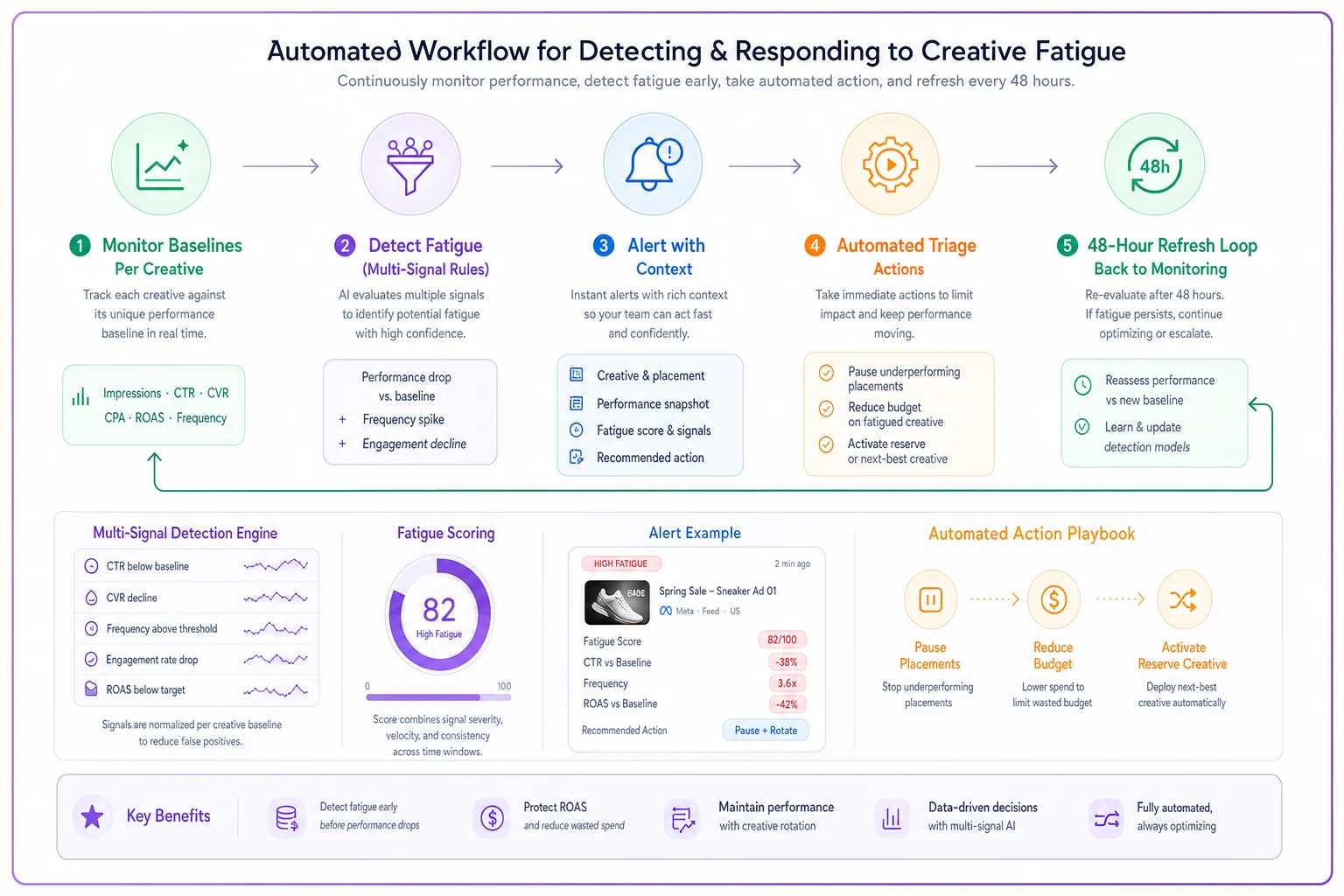
The graphic shows detection feeding into automated triage actions and the refresh cycle, with feedback loops for learning and threshold tuning.
Real-world impact: How one agency saved $180k annually
A performance marketing agency managing roughly $2M monthly ad spend implemented this framework last year. Before automation, they caught creative fatigue during weekly reviews—typically 5-8 days after onset. Quick math: 6 days of degraded performance across $2M monthly spend, assuming 15% efficiency loss during fatigue periods, meant roughly $15,000 monthly in suboptimal spend.
After implementing automated fatigue detection and refresh playbooks:
-
- Average detection time
18 hours from fatigue onset
-
- Refresh cycle time
36 hours from detection to new creative live
-
- Efficiency loss reduction
From 15% over 6 days to 8% over 2 days
The impact compounded because faster detection meant less audience burnout. Creatives refreshed early could return to rotation after 2-3 weeks, versus permanent retirement for severely fatigued assets. This reduced creative production needs by about 30%, saving both time and production costs.
But the bigger win was competitive advantage. While competitors ran fatigued creative for weeks, this agency maintained fresh, engaging ads consistently. Client retention improved, and they could take on 20% more spend without adding headcount.
Critical thresholds and alert rules for different campaign types
Different campaigns follow different fatigue patterns. Your detection system needs specific rules based on campaign objective, audience type, and creative format.
| Campaign Type | Frequency threshold | CTR decline trigger | Engagement rate decline | Alert timing | Response |
|---|---|---|---|---|---|
| Prospecting campaigns (cold traffic) | 3.8 | 30% from 7-day baseline | 25% from baseline | Check every 6 hours | Reduce budget 30%, prepare full refresh |
| Retargeting campaigns (warm traffic) | 6.5 | 25% from baseline | 20% from baseline | Check every 4 hours | Pause specific placements first, then refresh |
| Video campaigns | 3.0 | — | ThruPlay rate decline: 20% from baseline; 3-second view rate decline: 30% from baseline | Check every 4 hours | Try thumbnail refresh before full replacement |
| Carousel campaigns | 4.5 | 25% from baseline | Card-level CTR variance: Flag when one card drops 40% below others | Check every 8 hours | Rotate card order, refresh lowest performer |
These aren't universal truths—they're starting points. Track your actual fatigue patterns and adjust accordingly.
Common mistakes that make fatigue monitoring fail
Even with good intentions, most fatigue monitoring systems fail for predictable reasons.
Over-alerting kills adoption: Set thresholds too sensitive and you'll generate dozens of daily alerts. Teams quickly learn to ignore them. Start with conservative thresholds and tighten gradually. Better to catch 70% of real fatigue than generate 200% false positives.
Ignoring audience size: A frequency of 4.0 means something different for an audience of 10,000 versus 1,000,000. Small audiences naturally hit frequency walls faster. Adjust thresholds based on audience size, or you'll constantly get false alarms from small retargeting pools.
Not accounting for spend velocity: A creative spending $5,000/day fatigues differently than one at $100/day. High-spend creative needs tighter monitoring—check every 2-3 hours versus every 6-8 for lower spend. The potential loss from delayed detection scales with spend.
Forgetting about creative type: Static images, videos, and carousels fatigue at different rates. Video typically fatigues fastest, followed by static images, with carousels lasting longest due to multiple visual elements. Build different rules for different formats.
Missing seasonal patterns: That back-to-school campaign creative naturally shows different engagement in July versus September. Baseline calculations need seasonal adjustment, or you'll flag normal variations as fatigue.
When creative refresh actually hurts performance
Not all performance drops signal creative fatigue. Sometimes, refreshing creative disrupts winning formulas. Knowing when NOT to refresh is as important as knowing when to act.
Learning phase disruption: Facebook's learning phase isn't just about audiences—creative changes reset learning too. If a creative shows mild fatigue signals but remains profitable, sometimes it's better to reduce spend rather than refresh and reset learning.
Audience saturation versus creative fatigue: Sometimes the audience is exhausted, not the creative. Check if all creatives in an ad set show similar degradation. If yes, you have an audience problem, not a creative problem. Expand targeting rather than refresh creative.
Competitive pressure spikes: Major competitors launching campaigns can suddenly increase CPMs and decrease performance. This looks like fatigue but isn't. Check auction insights before assuming creative problems.
Platform changes: Algorithm updates, iOS changes, attribution windows—these all impact performance in ways that mimic fatigue. Multiple accounts showing similar patterns usually indicates platform issues, not creative problems.
Event-driven performance: Black Friday creative naturally shows different engagement on December 1st versus November 24th. Don't refresh based on post-event performance drops—that's expected behavior.
The key is context. Isolated performance drops from single creatives usually indicate fatigue. Simultaneous drops across multiple creatives or accounts suggest external factors.
The operational infrastructure that makes this sustainable
Building creative fatigue alerts and refresh playbooks isn't a one-time setup. It requires ongoing operational infrastructure to maintain effectiveness.
You need a creative performance database tracking historical metrics for every asset. This isn't just current performance—it's baseline establishment, fatigue patterns, refresh success rates. Without historical context, you can't identify patterns or improve detection.
Creative production pipelines must align with refresh cycles. If it takes you a week to produce new creative but fatigue hits in 4 days, the system breaks. Maintain that creative reserve, batch production sessions, and template systems for rapid iteration.
Clear escalation pathways prevent paralysis. Who approves emergency creative refreshes? Who decides between pause versus reduce spend? Can media buyers activate reserve creative without approval? Document these decisions before you need them.
Regular threshold auditing keeps the system accurate. Monthly reviews of false positives and missed fatigues. Adjust thresholds based on actual data, not theoretical models. What worked six months ago might be too sensitive or too loose now.
Most importantly, integrate fatigue management into standard workflows. It can't be a separate system people check occasionally. Make fatigue alerts part of daily standups, include refresh success in performance reviews, track efficiency gains in client reports.
Building your creative fatigue detection system
The gap between knowing about creative fatigue and actually catching it consistently comes down to systematic monitoring and defined response protocols. Most agencies understand the concept but lack operational infrastructure to manage it at scale.
Start with the detection framework. Pick 2-3 primary metrics, set conservative thresholds, monitor your highest-spend creative first. Don't try to perfect the system before launching—you'll refine thresholds based on real data, not assumptions.
Build your refresh playbook in stages. Document what you do when creative fatigues today, then systematize those steps. Create templates for common refresh types. Batch-produce creative variations during high-performance periods, not when you desperately need them.
The automation layer comes last, not first. Once you have working manual processes, then automate the repetitive parts. Monitoring calculations, alert triggering, and initial triage actions are perfect for automation. Strategic decisions about creative direction stay human.
Creative fatigue management is about efficiency optimization, not perfection. Catching 80% of fatigue cases 2 days earlier than you do now saves more money than building a perfect system that takes six months to implement. Start simple, track results, expand based on what actually drives improvement in your specific operation.
The agencies that master creative fatigue management don't just save money on wasted ad spend. They maintain better client performance, reduce team firefighting, and can scale spend more aggressively knowing their monitoring catches problems early. In a business where 10-15% efficiency improvements determine profitability, systematic creative fatigue management isn't optional—it's what separates agencies that scale from those that stagnate.
Creative fatigue detection and systematic refresh playbooks are operational investments, not creative whims. Establish conservative thresholds, automate monitoring and initial triage, maintain creative reserves, and iterate your rules from real data. Do this and you'll stop revenue bleeding from slow, silent performance decay.
Ready to elevate your agency's performance?
Join 2,000+ agencies using Digmaly to save time, boost efficiency, and deliver superior client results.