
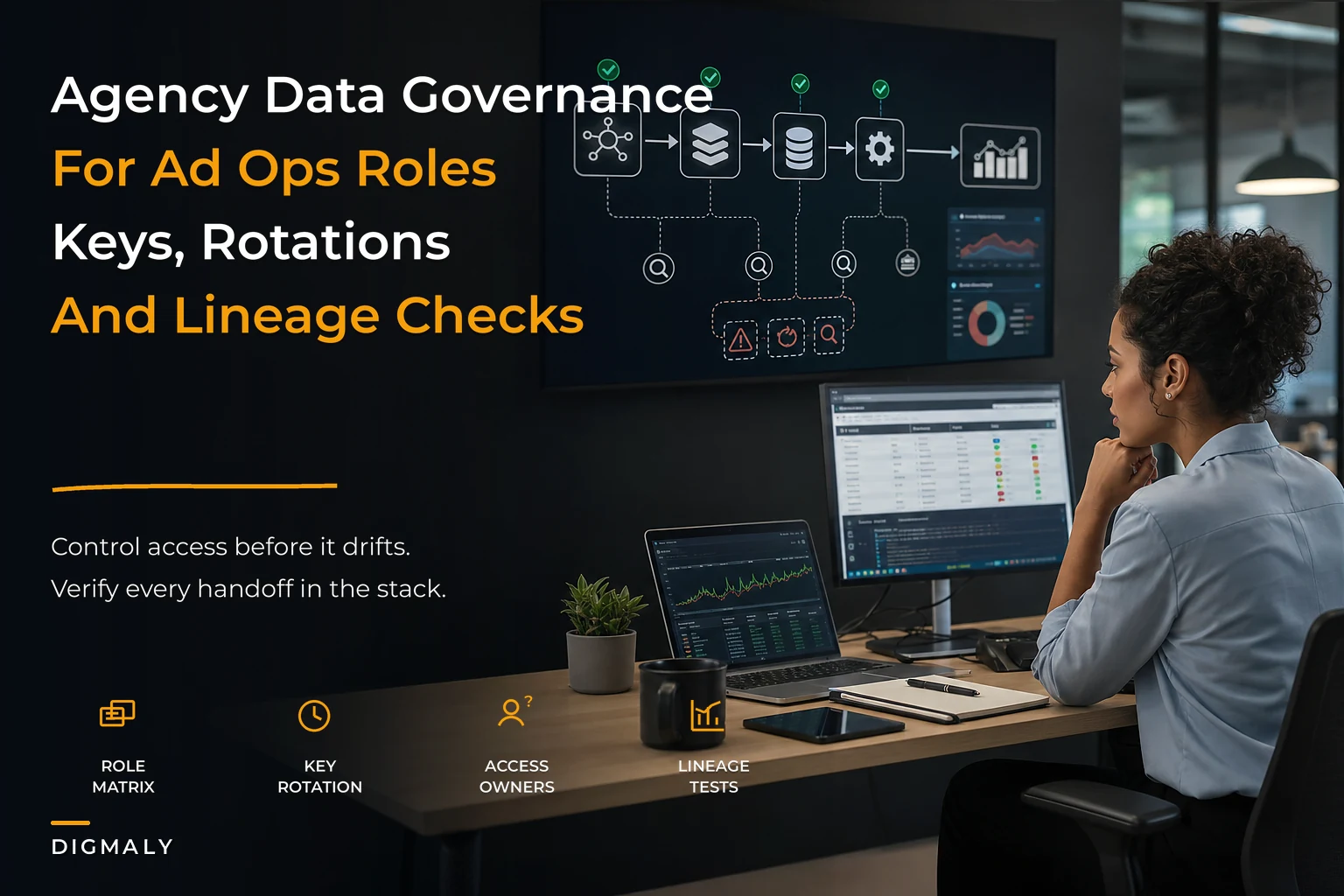

Every agency has experienced this at least once. A key employee leaves, and suddenly half your client accounts are locked behind their personal Google login. Or worse, you find out that contractor you let go six months ago still has admin access to three client ad accounts because nobody tracked who had what.
The real mess shows up when you're managing 40+ clients, each with their own set of platforms—Meta Business Manager, Google Ads, TikTok for Business, Amazon DSP, programmatic seats—and you have zero visibility into who can access what. One misplaced API key rotation breaks overnight data pulls for a dozen clients. A junior analyst accidentally pauses the wrong campaign because they had production access they never should have had. Your senior media buyer quits and takes all the institutional knowledge about which service accounts connect to which data pipelines.
Agency data governance isn't about compliance checkboxes or enterprise security theater. It's about not losing $400k in managed spend because someone deleted the wrong BigQuery dataset. It's about preventing that stomach-dropping moment when you realize a former employee could still access client data. More than anything, it's about building operational infrastructure that doesn't fall apart every time your team structure changes.
Permission drift: how agencies end up with security Swiss cheese
The chaos usually starts innocently. You're a five-person shop, everyone needs access to everything just to move fast. Sarah handles Meta campaigns but also needs Google Ads to check performance. Tom manages programmatic but jumps into TikTok when needed. Everyone shares the main MCC login because it's easier than dealing with individual permissions.
Then you hit 15 people. Contractors, specialists, junior analysts who definitely shouldn't have billing access—but your permission structure is still running on trust and Post-it notes. The Google Ads MCC has eight manager accounts nested underneath it, each with access levels nobody fully understands anymore. Meta Business Manager shows 47 people with various roles across 23 ad accounts, and realistically, at least 15 of them probably don't work there anymore.
By the time you're managing 30+ people and millions in spend, the permission debt has compounded badly. New employees get onboarded by copying access from whoever seems to have the right stuff. Platform reps create new user accounts during support calls that nobody tracks. API keys multiply across automation tools, reporting platforms, and internal scripts.
The scariest part? Most agencies have no idea who can actually access what until something breaks. That contractor you fired three months ago might still have admin rights to five client accounts through a shared Business Manager. The analyst who left last year could still be pulling client data through an API key that was never rotated. Your entire reporting infrastructure might depend on a service account tied to an employee email that gets deactivated, breaking dashboards for 20 clients overnight.
Building the permission matrix that actually works
First reality check: you cannot manage platform permissions in a spreadsheet once you're past about eight clients. The permission combinations get out of hand fast. Each platform has different role types, inheritance patterns, and edge cases that make manual tracking nearly impossible.
Eliminate marketing chaos with streamlined campaign control.
Digmaly lets you plan, execute, and track every campaign effortlessly.
- Unified campaign management
- Real-time client reporting
- Collaborative team workflows
No credit card required
Start with a three-tier role framework that maps to actual agency operations:
Tier 1 - Production Access: Can modify campaigns, budgets, and bidding. Limited to senior media buyers and account leads working directly on the account. Two or three people per client account, maximum.
Tier 2 - Analysis Access: Can view all data, create reports, and build audiences but can't touch campaigns. This covers analysts, junior team members, and cross-functional specialists who need visibility without edit rights.
Tier 3 - Billing/Admin: Separate track for financial permissions. Only ops leadership and finance. Never combined with production access for the same person.
| Role Type | Google Ads | Meta Business | TikTok | Amazon DSP | |
|---|---|---|---|---|---|
| Production Lead | Standard | Admin | Operator | Campaign Manager | Campaign Manager |
| Media Buyer | Standard | Advertiser | Operator | Campaign Manager | Campaign Manager |
| Analyst | Read-only | Analyst | Analytics | View-only | Viewer |
| Finance | Billing | Finance Editor | Finance | Billing Admin | Billing Admin |
| Contractor | Read-only (time-limited) | Analyst | Guest | View-only | Viewer |
This matrix becomes your source of truth for onboarding and offboarding. Most agencies create the matrix and never actually enforce it operationally. That's where it dies.
Credential lifecycle management that doesn't depend on remembering
The average agency manages somewhere between 200 and 500 unique credentials across all client accounts and platforms. Each Google MCC requires manager account access. Each Meta Business Manager needs proper role assignment. API keys for reporting tools, service accounts for data pipelines, OAuth tokens for automation platforms—the credential surface area is massive.
Manual credential management doesn't scale. You need automated rotation schedules and audit trails, not a password manager and good intentions.
MCC and Manager Account Rotation
-
Never use personal emails for MCC ownership
-
Create dedicated service accounts (agency-mcc-01@yourdomain.com)
-
Implement 2FA with hardware keys, not phone numbers
-
Maintain separate MCCs for enterprise clients vs. standard clients
-
Document which internal accounts have manager-level access to each MCC
API Key Management
-
Week 1 of Quarter — Rotate all production API keys, update automation platforms, and test data pipelines.
-
Week 6 of Quarter — Rotate backup and secondary keys, update documentation, and audit unused keys for deletion.
-
Week 11 of Quarter — Run a full security audit across all platform access, remove departed employee access, and update the permission matrix.
Centralized API key governance should cover all API keys created through team developer accounts (not personal), 60-day automatic rotation for all keys, a registry tracking which keys connect to which tools and scripts, automated alerts before key expiration, and backup keys for critical data pipelines.
-
Week 1 of Quarter
Rotate all production API keys Update automation platforms Test data pipelines
-
Week 6 of Quarter
Rotate backup/secondary keys Update documentation Audit unused keys for deletion
-
Week 11 of Quarter
Security audit of all platform access Remove departed employee access Update the permission matrix
Use hardware keys for 2FA on MCC and manager accounts.
MCCs are your biggest operational risk. Most agencies run everything through two or three main MCCs, which means one compromised account could expose dozens of clients. Build a 90-day rotation schedule for MCC admin passwords. More importantly, implement account segregation.
Platform-specific permission nightmares and solutions
Each advertising platform has its own special way of making permission management miserable.
Meta Business Manager Hell
Meta's permission system is genealogical—permissions inherit through paths that almost nobody fully understands. An employee might have access to an ad account through Business Manager, through a partner relationship, through the pixel, or through all three simultaneously.
The operational fix: never grant permissions at the user level, always through Business Manager roles. Document partner relationships separately from direct permissions. Audit pixel and catalog permissions quarterly—everyone forgets about those. Use Meta's Business Manager API to pull permission reports monthly.
Google Ads MCC Cascade Failures
Google MCC permissions cascade down in ways that create unexpected security holes. Grant someone access to a manager account, and they might inadvertently get access to all sub-accounts. The "administrative access" toggle is particularly dangerous—it looks harmless but grants billing access across the entire tree.
Worth building in: never grant MCC-level access for client-specific work, create intermediary manager accounts as permission buffers, use Google Ads API to audit effective permissions (the UI doesn't show inherited access clearly), and implement approval workflows for any permission changes above read-only.
Programmatic Platform Chaos
DSPs and programmatic platforms are the wild west of permissions. The Trade Desk, Amazon DSP, and DV360 all have completely different permission models. Seats cost money, credentials are scarce, and one misconfigured user can blow through budgets across multiple advertisers.
Platform-specific governance is the only real solution: maintain separate permission matrices for each DSP, track seat costs and utilization monthly, implement maker-checker for all programmatic campaign launches, and never share programmatic credentials, even temporarily.
Automated data-lineage checks that catch problems before clients do
Data lineage in agencies is a maze. Campaign data flows from platforms to warehouses to visualization tools to client dashboards. One broken connection in that chain, and suddenly your client is asking why their dashboard hasn't updated in three days.
Most agencies don't even know their actual data lineage. They have a vague sense that "data goes from platforms to dashboards" but couldn't map the specific path or identify failure points.
> FLOW: Platform → Collection → Storage → Transformation → Visualization (each step monitored with automated lineage checks)
-
Platform → Collection
How does data leave the advertising platform? API? Scheduled exports? Manual pulls?
-
Collection → Storage
Where does raw data land? BigQuery? S3? Snowflake?
-
Storage → Transformation
What processes clean and transform the data? DBT? Custom scripts? Spreadsheet macros?
-
Transformation → Visualization
How does cleaned data reach dashboards? Direct connection? Scheduled refreshes? Manual updates?
Once you understand the flow, implement lineage checks:
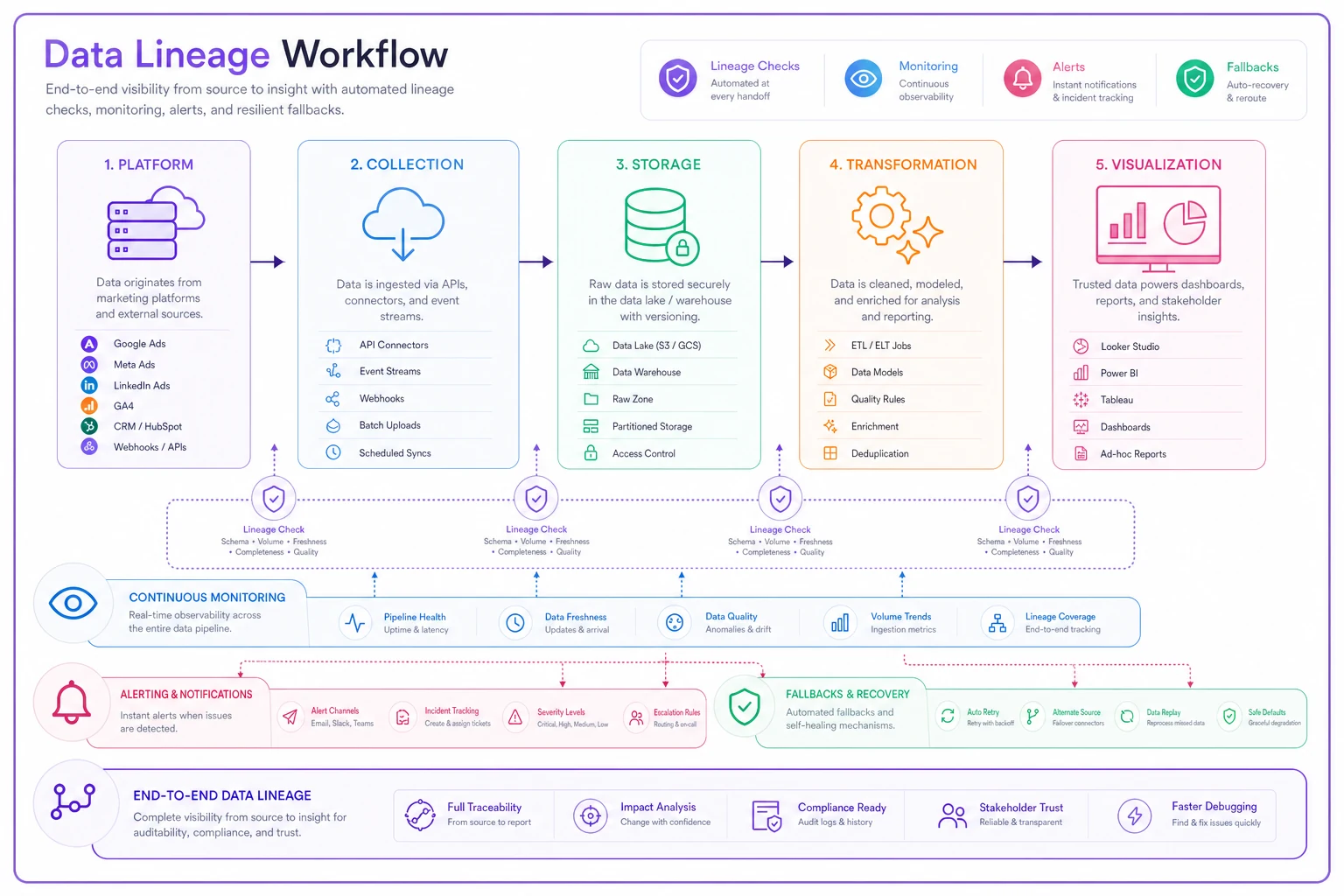
Here’s a concise view of the checks to implement at each handoff.
def checkdatalineage(clientid): checks = { 'platformapi': checkapiconnectivity(), 'lastdatapull': verifyrecentdata(), 'warehousewrite': confirmwarehouseupdate(), 'transformationrun': validatedbtsuccess(), 'dashboardrefresh': checkdashboardcurrency() } for step, status in checks.items(): if not status: alertopsteam(clientid, step) triggerfallbackprocess(step)
The key is automated monitoring at each handoff point. Don't wait for the client to notice their dashboard is stale. Build checks that run every four hours and alert you before the client even wakes up.
The offboarding checklist that prevents data breaches
Employee departure is when agency data governance usually fails badly. The person leaving knows weeks before they tell you. They have plenty of time to export client lists, download performance data, or just maintain access for later use.
The offboarding process that actually protects client data:
Hour 0 (Notification)
-
Disable email access
-
Suspend all platform logins through SSO
-
Revoke VPN and remote access
-
Begin API key audit
Hour 0-4
-
Pull permission report across all platforms
-
Identify owned assets (dashboards, scripts, automations)
-
Document knowledge transfer needs
-
Create list of client relationships to transition
Day 1-2
-
Rotate all API keys the employee had access to
-
Remove from all platform permissions
-
Transfer ownership of critical assets
-
Update client contact records
Week 1
-
Complete security audit across all systems
-
Verify no orphaned access remains
-
Update documentation and runbooks
-
Conduct permission verification with platform reps
The critical piece: build scripts that can execute the Hour 0 tasks in under 30 seconds. When someone is terminated, you don't have time to manually click through 15 platforms. A single script should suspend access everywhere simultaneously.
Sample enforcement scripts and automation
Theory without implementation is just expensive documentation. Here are practical scripts that enforce governance:
def auditgoogleadspermissions(): for mcc in MCCLIST: users = getmccusers(mcc) for user in users: if user.email not in APPROVEDEMAILS: flagunauthorizedaccess(user, mcc) if user.role > ROLEMAPPING[user.email]: flagexcessivepermissions(user, mcc) if user.lastlogin > 90days: flagdormantaccount(user, mcc)
def validateplatformaccess(): for employee in ACTIVEEMPLOYEES: actualaccess = getallplatformpermissions(employee) approvedaccess = PERMISSIONMATRIX[employee.role] violations = actualaccess - approvedaccess if violations: sendalert(f"{employee} has unauthorized access to {violations}") generaterevocationscript(employee, violations)
def rotatecredentialsquarterly(): for credential in CREDENTIALREGISTRY: if credential.age > 90days: newcredential = generatenewcredential(credential.type) updatedependentsystems(credential, newcredential) verifyrotationsuccess(newcredential) revokeoldcredential(credential) logrotation(credential, new_credential)
The migration playbook for fixing existing permission chaos
If you're reading this thinking "great, but we already have three years of permission debt," here's the practical path forward:
-
Phase 1 (Week 1-2)
Discovery
Run platform audits to understand current state. Export all user lists, document all API keys, map all data connections. Don't try to fix anything yet—just document reality, however ugly. -
Phase 2 (Week 3-4)
Critical Lockdown
Fix the scariest vulnerabilities first. Remove ex-employee access, rotate compromised credentials, eliminate shared logins. This is triage, not perfection. -
Phase 3 (Week 5-8)
Platform-by-Platform Migration
Take one platform at a time. Start with wherever you have the most spend at risk. Google Ads usually goes first, then Meta, then programmatic platforms. For each platform: export current permissions, map to the new role matrix, create a migration script, execute during a low-activity window, and verify access with each team member. -
Phase 4 (Week 9-12)
Automation Implementation
Once permissions are clean, implement automated checks. Daily permission audits, weekly lineage checks, monthly security reviews. This is where you build the operational infrastructure that prevents regression.
The migration will be messy. You'll break someone's access at the worst possible moment. A critical report will fail because you rotated the wrong API key. But waiting for a security breach or a client data leak is exponentially worse.
Building operational resilience through governance automation
The end goal of agency data governance isn't perfect security—it's operational resilience. When someone quits suddenly, you should be able to revoke access in minutes, not days. When a client questions data accuracy, you should be able to trace the exact lineage from platform to dashboard. When you onboard a new analyst, they should get exactly the permissions they need, nothing more.
This is where AI-powered operational software moves agency governance from a compliance exercise into an actual competitive advantage. Instead of manually checking permissions across 15 platforms, automated systems continuously scan for violations. Rather than hoping someone remembers to rotate credentials quarterly, the system handles it automatically and only alerts you when something fails. Your operational campaign orchestration framework needs proper governance underneath it, or the whole thing becomes vulnerable to single points of failure.
A solid governance platform tracks every permission change, every data access, every credential rotation in an audit log that answers compliance questions instantly. When a client asks who had access to their account on a specific date, you generate the report in seconds rather than spending hours piecing it together.
More than anything, governance automation removes the human friction that makes these systems fail in practice. Nobody wants to manually update permission matrices. Nobody remembers to rotate API keys on schedule. But when those tasks are automated—triggered by employee changes in your HR system or scheduled rotations in your operational calendar—governance actually happens instead of sitting permanently on a to-do list.
From permission chaos to operational control
Agency data governance sounds like bureaucracy until you're staring at a locked MCC at 9 PM on a Thursday because the only person with admin access just quit. Or until you find out a former contractor has been downloading client performance data for their new agency. Or until a junior analyst accidentally burns through $50k because they had production access they had no business having.
The permission matrices, rotation schedules, and audit scripts aren't about building corporate compliance theater. They're about building an agency that can scale beyond the institutional knowledge of any single person—and about being able to sleep at night knowing client data is secure, access controls are enforced, and your operational infrastructure won't collapse because someone forgot to document a critical API key.
Your paid media onboarding checklist prevents launch delays, but without proper governance underneath, you're building on quicksand. Your KPI governance and reporting strategy depends on clean data lineage and controlled access—otherwise you're just building beautiful dashboards out of questionable data.
Start with the permission matrix. Map current reality, no matter how ugly. Build an offboarding checklist you'll actually execute under pressure. Implement one automated check, then another, then another. In six months, you'll have gone from playing permission roulette to running an agency with real operational control. The governance infrastructure you build today is what makes scaling actually possible.
Ready to elevate your agency's performance?
Join 2,000+ agencies using Digmaly to save time, boost efficiency, and deliver superior client results.