

Every agency has a graveyard of integrations that "worked when we set them up." A CDP that silently stopped forwarding conversions three weeks ago. A call-tracking vendor whose API key expired and nobody noticed until a client asked why lead volume dropped 40%. A server-side partner that started deduplicating events differently after a platform update, quietly inflating ROAS on a report you already sent.
Vendor integrations rarely fail loudly. They degrade. And by the time someone spots it, you've usually got two weeks of bad data, a client who trusts you a little less, and an engineer digging through vendor documentation trying to figure out what changed.
This post is about building vendor integration governance into your agency so those failures stop happening — or at least get caught in hours instead of weeks. Not vague "have a process" advice. The actual onboarding checklist, the test harness you run before anything touches production, how you scope credentials so one vendor can't nuke an account, and the QA gate plus rollback plan that keeps a bad integration away from your clients.
Why vendor integrations quietly rot
Before the checklists, it's worth being honest about why this keeps happening, because the fixes only make sense once you understand the actual failure modes.
-
Nobody owns the integration after launch. The person who set it up moved to another account. The vendor pushed a breaking change. No alert fired because no one built one.
-
Credentials are over-scoped. A tag manager or measurement vendor gets full account access "to be safe," which means a bug or a compromised token can edit campaigns, not just read data.
-
There's no baseline to compare against. When a server-side partner starts sending 12% fewer purchase events, you have nothing to diff it against, so it looks like normal fluctuation.
-
Contracts and data contracts drift apart. The signed agreement says the vendor sends hashed emails. Six months later they changed their payload and now they're sending something else, and your data-sharing terms no longer match reality.
That last one is the sneaky failure mode. The commercial contract and the data contract — the actual shape, fields, and guarantees of the data flowing between systems — are two different things, and they drift independently. This connects closely to how you handle roles and credential hygiene generally, which we've covered in our piece on agency data governance for ad ops.
The vendor onboarding checklist
Governance starts before a single pixel or line of code goes live. The goal is to make onboarding boring and repeatable so nothing gets skipped when the account team is in a hurry.
Eliminate marketing chaos with streamlined campaign control.
Digmaly lets you plan, execute, and track every campaign effortlessly.
- Unified campaign management
- Real-time client reporting
- Collaborative team workflows
No credit card required
-
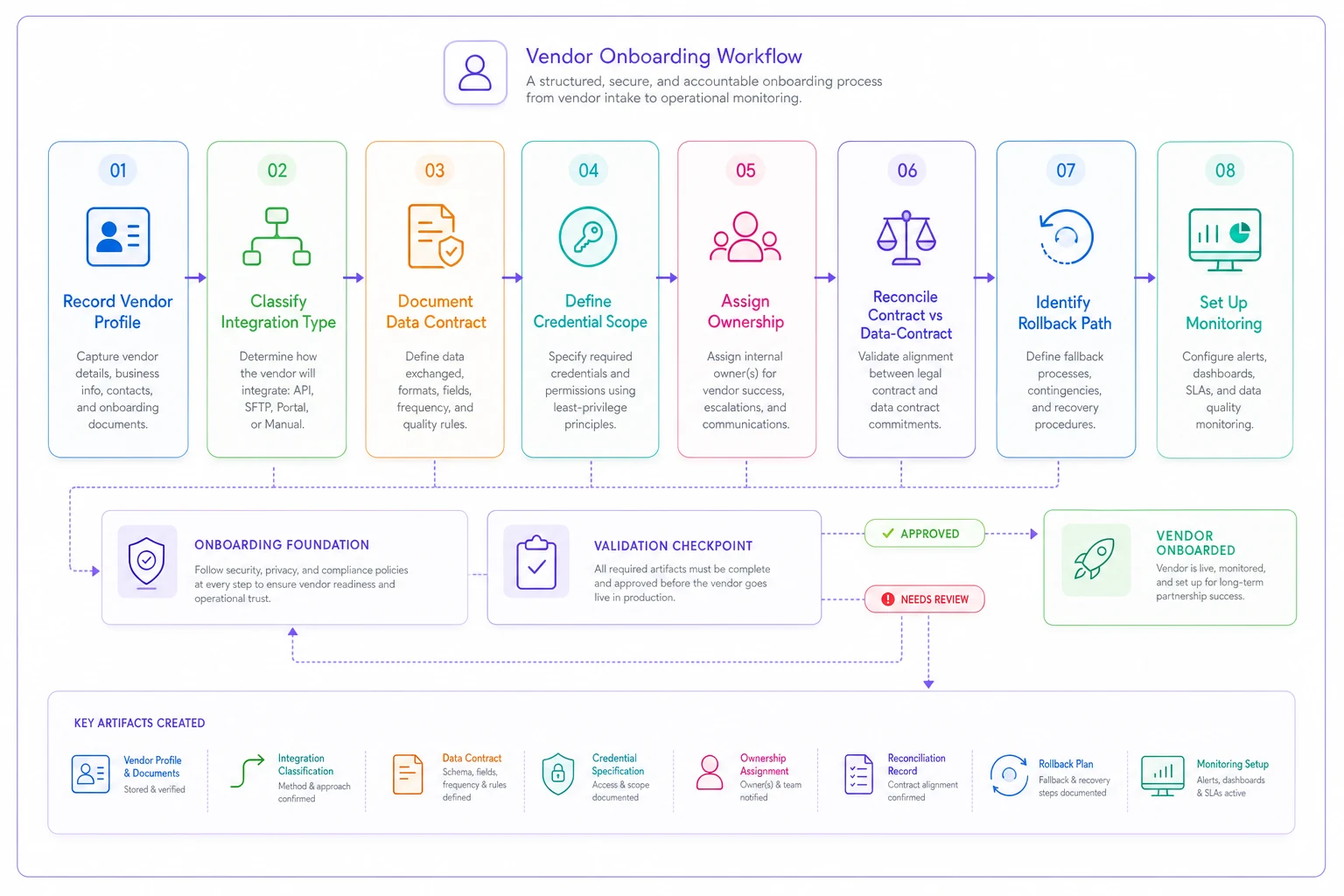
Vendor profile recorded — legal entity, primary contact, support SLA, escalation path, and where their status page lives.
-
Integration type classified — client-side pixel, server-side event forwarder, API pull/push, or webhook. Each type has different failure modes and different QA needs.
-
Data contract documented — exact fields sent and received, identifiers used (hashed email, click ID, order ID), event names, and the expected volume range per day.
-
Credential scope defined — read-only vs. write, which accounts or properties, and the minimum permission set required. Write it down before you request access.
-
Ownership assigned — a named person responsible for the integration's health. Not a team. A person.
-
Contract vs. data-contract reconciliation — confirm the signed terms (data sharing, retention, sub-processors) actually match what the integration technically does.
-
Rollback path identified — how you turn this vendor off cleanly and what breaks when you do.
-
Monitoring plan — what metric proves the integration is alive, and what threshold triggers an alert.
The reconciliation step is where agencies save themselves from real trouble. A typical example: a call-tracking vendor's contract says data stays in-region, but their integration routes through a US endpoint. You only find that out if someone checks the technical path against the paperwork — which is exactly the point of the checklist.
Below is a simple diagram of the onboarding workflow.
The reconciliation step is where agencies save themselves from real trouble. A typical example: a call-tracking vendor's contract says data stays in-region, but their integration routes through a US endpoint. You only find that out if someone checks the technical path against the paperwork — which is exactly the point of the checklist.
Test-harness templates: prove it works before it's live
A test harness is a repeatable set of checks you run against an integration in a staging or sandbox environment before promoting it to production. Most agencies skip this because it feels like engineering overhead. But you don't need a full CI pipeline — you need a consistent template per integration type.
For a server-side event partner:
-
Fire a set of 20–30 known test events with predictable values (specific order IDs, known revenue amounts).
-
Confirm each event arrives at the destination platform with the correct event name and parameters.
-
Check deduplication — send the same event via client-side and server-side, confirm it counts once.
-
Verify identifier hashing matches the expected algorithm and casing.
-
Measure the delay between send and receipt; record it as your baseline latency.
For an API pull (e.g., pulling spend from an ad platform partner):
-
Pull a known historical date range and compare totals against the platform UI.
-
Confirm currency, timezone, and attribution window match your expectations.
-
Test what happens on a rate-limit or auth failure — does it retry, error loudly, or fail silently?
The part most teams miss: your test harness should capture a baseline snapshot — expected event volume, revenue totals, latency — and store it. That snapshot becomes the thing you diff against when something drifts later. Without it, "is this broken or just Tuesday?" is genuinely unanswerable.
And testing only the happy path will catch up with you. The integration works when the data is clean. Nobody tests what happens when the vendor returns a 500, sends a malformed payload, or times out. Those are exactly the conditions that cause silent data loss in production.
Permission-scoped credential management
This section is the one most likely to save you from a genuine disaster.
| Practice | Common approach | Scoped approach |
|---|---|---|
| Access level | Full account / admin | Read-only unless writes are required |
| Scope boundary | Entire account | Specific property, dataset, or campaign group |
| Rotation | "Whenever we remember" | Scheduled, with calendar reminders and an owner |
| Storage | Shared doc or Slack DM | Secrets manager with access logging |
| Offboarding | Left active after project ends | Revoked automatically when ownership ends |
A few practical rules that hold up in real operations:
-
Separate credentials per vendor per client. Never reuse one token across accounts. When you rotate or revoke, you want to affect exactly one relationship.
-
Prefer service accounts over personal logins. When the person who connected the vendor leaves, the integration shouldn't die with their account.
-
Log credential usage. If you can see when a token was last used and from where, spotting a compromised or abandoned integration becomes straightforward.
Use a secrets manager with access logging to store credentials.
For rotation schedules and the role matrices that govern who can request write access in the first place, the deeper walkthrough lives in our ad ops data governance guide. Pair it with this and you've closed most of the credential gap.
The integration QA gate
Think of the QA gate as the single checkpoint every integration must clear before it can influence a client's reporting or spend. Nothing gets promoted to production on trust alone.
-
Test harness passed — all events or pulls match expected values in staging.
-
Baseline recorded — volume, revenue, and latency snapshot stored.
-
Credential scope verified — access confirmed as minimum-necessary, logged, and owned.
-
Data contract signed off — actual field-level output matches the documented contract.
-
Monitoring live — the alert watching this integration is deployed and tested (trigger it once deliberately to confirm it fires).
-
Rollback rehearsed — someone has actually walked through disabling it.
All six green before anything goes live. It sounds heavy, but for most integrations this is a 30–45 minute process once your templates exist. The alternative — discovering a broken pixel three weeks and one frustrated client later — costs considerably more.
One overlooked detail: test the alert by breaking the integration on purpose. A monitoring rule that's never fired is just a hope. Point it at a deliberately misconfigured test integration and confirm someone actually gets pinged.
Rollback playbook: what you do when it goes wrong
Even with a solid gate, integrations break — vendors push changes, platforms deprecate endpoints. The difference between a minor inconvenience and a client-trust event is whether you can roll back cleanly and fast.
-
How do we disable it? The exact steps to turn the vendor off — remove the pixel, revoke the token, disable the forwarder.
-
What breaks when we do? Does disabling it stop conversion data entirely, or just this one source? Is there a fallback (e.g., client-side pixel still firing while server-side is down)?
-
How do we backfill? If data is lost during the outage, can it be reprocessed, or is it gone?
-
Who communicates to the client, and what do they say? A short, honest script beats silence every time.
Calm teams write the rollback down at onboarding, not during the incident. When a server-side partner corrupts your dedup logic at 4pm on a Friday, you don't want to be reverse-engineering how to shut it off while a client is asking questions.
For the broader framing of guardrails, audit trails, and rollback thinking applied to automated systems more generally, our post on avoiding automation disasters with AI governance covers the same discipline from the campaign-automation angle.
The contract and data-contract checklist
Two documents, both easy to let drift. The commercial contract governs the relationship; the data contract governs the bytes. Keep both current or they'll quietly disagree with reality.
Commercial contract:
-
Data-sharing terms and permitted use
-
Retention and deletion obligations
-
Sub-processors and where data physically lives
-
SLA, uptime commitments, and support response times
-
Termination and data-return clauses
Data contract:
-
Exact fields sent and received, with types
-
Identifiers and hashing/normalization rules
-
Event names and taxonomy
-
Expected volume ranges and update frequency
-
Versioning
how the vendor communicates breaking changes
The mistake is treating the data contract as a one-time setup artifact. It's a living spec. When a vendor changes their payload, your data contract should be the document you update and the thing your test harness checks against. Keep those two in sync and drift gets caught automatically rather than during a client escalation.
A real scenario
A mid-sized performance agency managing around 20 ecommerce clients had a server-side conversion partner wired into most accounts. One platform update changed how the partner handled event deduplication, and for roughly 11 days, purchase events on about half their clients were being double-counted.
Nobody caught it immediately because reported ROAS looked good — better than usual, which is exactly why nobody questioned it. It surfaced when one client's finance team reconciled ad-reported revenue against actual Shopify orders and found a 30% gap.
Cleanup took the ops team close to two weeks: reprocessing events, reissuing corrected reports, and a couple of tense client calls. Two clients put spend increases on hold pending "confidence in the numbers."
Afterward they built exactly what's in this post — an onboarding checklist, a per-vendor baseline snapshot, and a monitoring rule that alerts when reported conversions diverge from a sanity range. Next time a vendor changed behavior, the alert fired within a day. The fix was a same-afternoon rollback. No client ever saw a bad report.
When heavy governance makes sense — and when it's overkill
Not every integration deserves the full treatment, and pretending otherwise just gets the process ignored.
This full stack makes sense when:
-
The integration touches conversion data, spend, or anything that influences optimization or billing.
-
You're forwarding client PII or hashed identifiers.
-
The vendor has write access to accounts.
-
You manage enough clients that one silent failure hits many at once.
You can go lighter when:
-
It's a read-only reporting connector that doesn't feed decisions or billing.
-
It's a short-lived test integration in a sandbox.
-
The blast radius is genuinely limited to one non-critical dataset.
Who should not skip this entirely: any agency that reports client-facing revenue or ROAS, or manages budgets through vendor tools. A silent data failure there isn't a fixed bug — it's the client's trust, and that doesn't roll back.
Bringing it together
The uncomfortable truth about vendor integrations is that the setup is the easy 20%. The other 80% — knowing what a credential can do, having a baseline to detect drift, catching breaking changes before a client does, being able to shut something off cleanly — is what actually protects the agency.
You don't need enterprise tooling for this. You need a checklist that's actually followed, credentials scoped to the minimum, a test harness that captures a baseline, a QA gate nothing skips, and a rollback plan written before you need it. Build those once, template them per integration type, and the whole category of "why did the numbers change" incidents mostly disappears.
Start with your riskiest integration — the one touching conversions or spend across the most clients — and run it through the checklist this week. You'll almost certainly find at least one over-scoped credential or a data contract that no longer matches reality. That's the point.
Ready to elevate your agency's performance?
Join 2,000+ agencies using Digmaly to save time, boost efficiency, and deliver superior client results.