

Most agencies don't have a creative production problem. They have a coordination problem that only looks like a creative problem when a deliverable goes out late or comes back wrong.
You can usually spot it in the file names. ClientAdFinalv2REALfinalUSE_THIS.psd isn't a design failure. It's the fingerprint of a broken intake and versioning process — three people editing the same asset with no shared source of truth, a client comment buried in a Slack thread, and a designer who guessed at the brief because half of it was verbal.
This is a working SOP you can copy, adapt, and drop into your ops docs. It's built around the exact points where agency creative production usually breaks: intake, versioning, approvals, SLA timing, and outsourcing handoff. There's also a reserve-creative protocol at the end that most teams skip until a campaign stalls at 11pm before a launch.
## Why creative production breaks (it's almost never the design)
Before the SOP, it helps to name where the leaks actually are — because if you don't, you'll build process around the wrong step.
-
The brief was 60% written and 40% "we talked about it on the call."
-
The designer built to their interpretation, which was reasonable but wrong.
-
Feedback came in from three people, partially contradicting each other.
-
Nobody knew which version was current, so someone edited an old file.
-
The final approval happened over a thumbs-up emoji, so there's no record of who signed off.
None of that is a talent issue. It's an information-routing issue. A good creative production SOP for an agency isn't there to make designers more creative — it's there to make sure the right information arrives in the right format before work starts, and that the right version moves forward at every gate.
The rest of this is the actual system.
## Part 1 — The intake brief template (with mandatory fields)
The single biggest lever is refusing to start production until the brief is complete. Not "mostly complete." Complete. A half-brief guarantees a revision round, and revision rounds are where margin quietly dies.
Eliminate marketing chaos with streamlined campaign control.
Digmaly lets you plan, execute, and track every campaign effortlessly.
- Unified campaign management
- Real-time client reporting
- Collaborative team workflows
No credit card required
Here's the intake brief structure. Fields marked [MANDATORY] should hard-block the request from entering the production queue if they're empty.
Project identity
-
[MANDATORY] Client name + brand code
-
[MANDATORY] Project name (human-readable, e.g.
Q1-Retargeting-Static) -
[MANDATORY] Requesting AM / project owner
-
[MANDATORY] Due date + hard-or-soft flag (is this a real deadline or a preference?)
Deliverable spec
-
[MANDATORY] Channel + placement (Meta feed, Meta Stories, YouTube pre-roll, etc.)
-
[MANDATORY] Exact dimensions + aspect ratios needed
-
[MANDATORY] File formats and max file size
-
Number of variants requested
-
Animation/static/video
Creative direction
-
[MANDATORY] Objective (what should this asset do? — click, install, awareness)
-
[MANDATORY] Primary message / hook
-
[MANDATORY] Mandatory copy (headline, CTA, legal/disclaimer text — exact wording)
-
Tone / references / mood links
-
Do-not-use list (competitor language, banned claims, off-brand colors)
Assets & constraints
-
[MANDATORY] Links to logos, product shots, fonts, brand kit
-
Existing performance data if this is a refresh (what's fatiguing, what to keep)
-
Legal review required? Y/N
Sign-off routing
-
[MANDATORY] Who approves internally
-
[MANDATORY] Who approves on the client side (name a person, not "the client")
The "name a person, not the client" field seems small. It isn't. A huge amount of approval lag comes from ambiguity about who actually has authority to say yes. When five people can comment but nobody owns the final call, you get infinite loops.
One practical note on refreshes: if the intake is for replacing a decaying ad, the brief should carry the fatigue data with it so the designer isn't building blind. If you don't already have a system flagging when creative is decaying, that's worth fixing first — this creative fatigue alerts and refresh playbook covers the trigger side of that workflow.
## Part 2 — File and version schema (kill the "final_final" problem)
Versioning chaos is fixable with two things: a naming convention nobody is allowed to break, and a single canonical location per asset.
Here's a schema that holds up under pressure:
``
[BRANDCODE][PROJECT][PLACEMENT][VERSION][STATUS].[ext]

Example:
ACMEQ1RetargetMetaFeed1x1v03INREVIEW.psd
ACMEQ1RetargetMetaFeed1x1v04APPROVED.mp4
``
| Element | Values | Rule |
|---|---|---|
| Version | v01, v02, v03… | Increments on every substantive edit, never on tiny tweaks unless exported |
| Status | WIP, INREVIEW, REVISE, APPROVED, DELIVERED | Only one file per project can hold APPROVED at a time |
| Placement | Feed1x1, Story9x16, etc. | Must match the intake spec exactly |
The rule that actually prevents disasters: APPROVED is exclusive. When a new version gets approved, the previous APPROVED gets moved to an /archive subfolder the same day. If two files both say APPROVED, someone is going to ship the wrong one — usually to the client, usually the morning of launch.
The common mistake is treating the naming convention as optional guidance. It has to be enforced at the folder level or it decays within a couple of weeks. If your team works in a shared workspace or DAM, lock the top-level structure so people can't invent their own folders mid-project. Loose folder permissions are how you end up with the same asset living in four places, each slightly different.
## Part 3 — Approval gates (where work is allowed to move)
An approval gate is a checkpoint where an asset can't advance until a specific person signs off. Without defined gates, everything becomes one big blurry review and nobody really knows what "done" means.
Use three gates. More than that slows everything down; fewer, and quality problems slip through.
-
Gate A — Internal creative check. Senior designer or creative lead reviews for brand accuracy, spec compliance, and obvious errors before the client ever sees it. Roughly 80% of embarrassing revisions get caught here — wrong dimensions, typos in the headline, logo on the wrong side.
-
Gate B — Internal strategy/AM check. The account owner confirms the asset matches the brief's objective, not just its aesthetics. This is where "looks great but doesn't say what the client asked for" gets stopped.
-
Gate C — Client approval. The named client approver signs off in writing. Not an emoji. A dated comment or an approval status in your project tool that creates a record.
Worth calling out: agencies that skip Gate A to "save time" almost always spend more time overall, because errors that should have been caught internally now travel through a client review round. A client catching your typo costs you far more than a lead designer catching it — it costs trust, which is the thing you can't rebuild with a re-export.
Here's a simple visual if you want to show the team how the gates stop issues early.
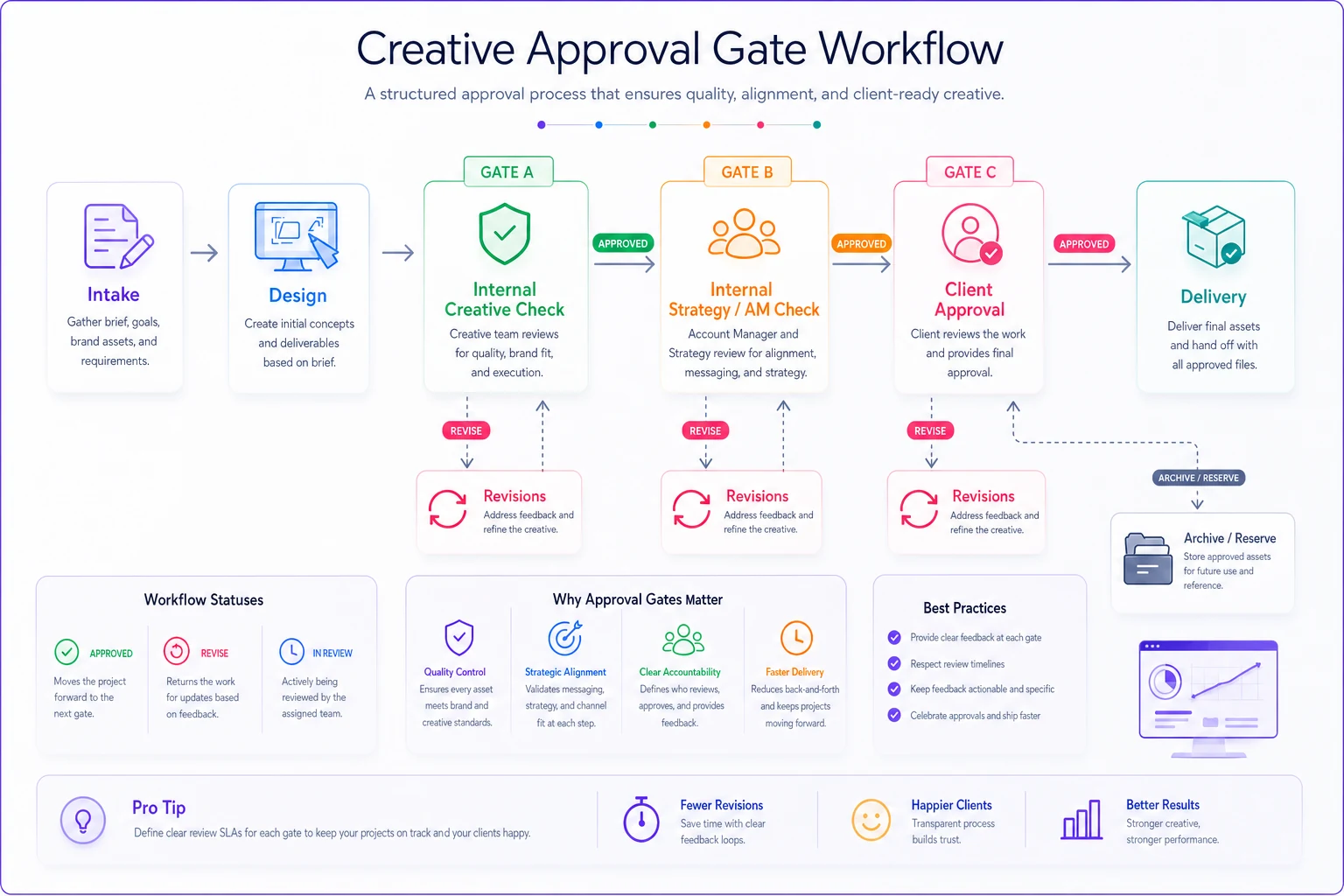
Agencies that measure and enforce these gates consistently spend less time fixing avoidable problems and more time on real creative work.
## Part 4 — SLA timings (so "when will it be done" has an answer)
SLAs turn creative production from a vibe into a schedule. The goal isn't rigidity — it's making capacity visible and giving AMs a real answer instead of "soon."
| Deliverable type | First draft SLA | Revision round SLA | Max revision rounds |
|---|---|---|---|
| Static ad (single placement) | 1 business day | 4 business hours | 2 |
| Static set (3–5 variants) | 2 business days | 1 business day | 2 |
| Animated / short video | 3–4 business days | 1 business day | 2 |
| Landing page assets | 2–3 business days | 1 business day | 2 |
| Rush (flagged, capacity-permitting) | Same day / next AM | 2 business hours | 1 |
Two rules make SLAs actually work:
-
The clock starts on a complete brief, not on the request. If intake is missing mandatory fields, the SLA doesn't begin. This single rule ends most "you're late" arguments, because lateness usually traces back to an incomplete handoff.
-
Revision rounds are capped. After the max rounds, the request goes back through intake as a new brief. Uncapped revisions are how a two-hour job becomes a two-week job, and the P&L never shows why.
If you're constantly blowing SLAs, the problem is usually upstream in how work enters the shop, not designer speed. A tighter intake at the campaign level helps — the same discipline that stops launch delays and broken tracking during onboarding applies to creative intake: garbage in, delays out.
## Part 5 — Reserve-creative protocol (the part everyone skips)
This is the section that saves campaigns. A reserve-creative protocol means you always have approved, on-brand backup assets ready before you need them — so a rejected ad, a sudden fatigue spike, or a last-minute client pull doesn't leave a campaign running on empty.
-
Maintain a reserve ratio. For every live creative concept, keep at least one fully-approved alternate in the
/reservefolder, already through all three gates. -
Pre-approve reserves during the main review, not after. When the client signs off on the primary, get them to sign off on the backup in the same session. Approval fatigue works in your favor here — they're already in review mode.
-
Tag reserves by trigger. Label each reserve with why it exists
RESERVE-fatigue,RESERVE-disapproval,RESERVE-seasonal-swap. That way the swap decision is instant. -
Refresh the reserve pool monthly. Reserves decay too. An unused reserve from four months ago probably references an outdated offer.
The thing most agencies miss: reserves aren't extra work, they're reused work. The concepts your team explored and discarded during the main creative round are 70% of the way to being a reserve. Instead of deleting them, finish and bank them.
## Part 6 — Outsourcing handoff checklist
When you send work to a freelancer or production partner, the failure mode shifts: they don't have your tribal knowledge, so anything you didn't write down, they'll get wrong. The handoff has to be self-contained.
-
[ ] Completed intake brief attached (all mandatory fields)
-
[ ] Brand kit link with fonts, logos, color values, spacing rules
-
[ ] Exact deliverable specs (dimensions, formats, file size caps)
-
[ ] File naming convention document included
-
[ ] Which version status they should deliver at (usually
v01_INREVIEW) -
[ ] Where they upload the delivery (locked folder, correct path)
-
[ ] Revision expectations + turnaround agreed in writing
-
[ ] Contact person for questions (one person, not the whole channel)
-
[ ] NDA / usage rights confirmed if client work
-
[ ] Do-not-use list included
The mistake is assuming a good freelancer will "just know" your standards. They won't, and it's not their job to. The handoff checklist is the difference between an external partner who slots into your pipeline cleanly and one who generates a revision round every single time.
## Where a workflow platform actually helps
You can run all of this in shared folders and a spreadsheet, and plenty of agencies do at first. It works until volume rises — then the manual parts start slipping. Someone forgets to archive the old APPROVED file. The SLA clock is tracked in someone's head. A reserve pool goes stale because nobody owns the monthly refresh.
This is where an AI-assisted operational platform earns its keep — not by doing the creative, but by holding the process together. Practically, that looks like intake forms that won't submit without mandatory fields, version status that updates automatically as assets move through gates, SLA timers that start on brief completion and flag at-risk deliverables before they're late, and handoff packets that assemble themselves from the brief. The value isn't automation for its own sake; it's that the coordination layer stops depending on people remembering to do the boring, easy-to-forget steps.
Keep it proportionate. The SOP is the source of truth. Software just enforces it consistently so your team doesn't have to police every folder by hand.
## A quick real scenario
A mid-sized performance agency — around 12 people, mostly paid social — was running roughly 25–30 creative requests a week through Slack and a shared drive. No formal intake, no version rules. On-time delivery was hovering around 60%, and about a third of jobs needed an extra revision round that traced back to an incomplete brief.
They rolled out the intake template with mandatory-field blocking, the naming schema, and three approval gates. Nothing fancy on the tooling side at first — just discipline plus a form.
Within a couple of months, the first-draft-right rate climbed noticeably because designers stopped guessing, and the "surprise late" deliveries mostly disappeared since the SLA clock only started on a complete brief. The reserve protocol paid off the first time a Meta disapproval hit before a launch — the swap took minutes instead of a panicked evening. Revision rounds per project dropped from roughly two to closer to one. That's not a dramatic transformation, but recovering a full revision round across 100+ jobs a month is real hours back, and the client-facing errors — the expensive kind — got rare.
## When this level of SOP makes sense (and when it doesn't)
Do this if you're running more than a handful of creative requests a week, if you're using freelancers or outsourced production, or if late deliveries and versioning mistakes are already costing you client trust.
Don't over-engineer if you're a two-person shop shipping a few assets a month. Three approval gates and a reserve pool will slow you down more than they help. Start with just the intake template and the naming convention — that alone fixes most of the pain at small scale.
Who should skip the reserve protocol specifically: teams whose spend is low enough that a few hours of a paused ad doesn't matter. The reserve system is insurance, and insurance only makes sense when the downside is expensive.
The whole point of a creative production SOP isn't control for its own sake. It's making the handoffs between people explicit, so the work moves predictably and mistakes get caught long before they reach a client. Get intake and versioning right first — the rest of the system has something solid to stand on.
Get intake and versioning right first — the rest of the system has something solid to stand on.
Ready to elevate your agency's performance?
Join 2,000+ agencies using Digmaly to save time, boost efficiency, and deliver superior client results.