



Most agencies don't pick a reporting tool. They inherit one. Someone signed up for a trial three years ago, built a Google Ads dashboard, and now forty client reports depend on it. Nobody remembers why that platform, and nobody has time to reevaluate.
The problem shows up later — usually around 25–30 retainer clients. That's when the reporting stack stops being a convenience and starts being an operational liability. A metric gets defined differently across two dashboards. A junior account manager exports a PDF with a broken data connector and nobody catches it before it hits the client's inbox. The "conversions" number in your monthly deck doesn't match what the client sees in their own ad account, and now you're spending a call defending your numbers instead of talking about strategy.
This piece compares three agency-centric platforms on the things that actually break at scale: narrative templating, KPI governance, and automated PDF delivery. Not feature counts. The stuff that determines whether your reporting holds up when you have five people building decks for sixty clients.
Why the three tools split the way they do
Before the feature tables, it helps to understand what each platform is actually for, because they were built for different agency shapes.
Whatagraph leans visual and cross-channel. Its core strength is pulling many data sources into one branded, good-looking report quickly. Agencies that sell polish — where the deck itself is part of the perceived value — tend to land here. The tradeoff is that deep governance (locked metric definitions, strict role separation) is thinner than you'd want at real scale.
AgencyAnalytics is the workhorse. Built around the many-clients model: client-level dashboards, white-label portals clients can log into themselves, a large connector library. Governance features and staff permissions are more mature here, which matters when you have account managers who shouldn't be able to edit shared templates.
ReportGarden sits closer to the "reporting plus light client management" space — budgets, some workflow, PPC-heavy roots. Often chosen by agencies that want reporting bundled with a bit of account operations rather than a pure dashboard tool.
Worth naming a pattern here: agencies almost always choose on the demo screenshot — which report looks nicest — and almost never on governance, which is what actually costs them money 18 months later. The pretty tool that lets anyone redefine "cost per lead" on any dashboard will burn you slowly.
Mapping governance requirements to platform features
If you've already built out KPI definitions and a reporting strategy — and if you haven't, this breakdown on building reporting around KPI governance and client narratives is the place to start — the question becomes: which platform enforces that governance versus which one just displays numbers.
Eliminate marketing chaos with streamlined campaign control.
Digmaly lets you plan, execute, and track every campaign effortlessly.
- Unified campaign management
- Real-time client reporting
- Collaborative team workflows
No credit card required
-
Metric definition consistency — "conversions" means the same thing on every report
-
Template locking — junior staff can populate but not redefine
-
Role-based access — who can edit shared assets vs. client-facing views
-
Audit trail — who changed what, when
-
Data freshness / connector health — visible warnings when a source breaks
Here's roughly how the three map. Treat this as directional — vendors move features between tiers regularly, so verify against current plans before you commit.
| Governance need | Whatagraph | AgencyAnalytics | ReportGarden |
|---|---|---|---|
| Reusable locked templates | Yes (template library) | Strong (shared + locked templates) | Yes |
| Metric/definition standardization | Partial — per-widget | Better — dashboard-level standards | Partial |
| Role-based staff permissions | Basic on lower tiers | Granular, matures by mid tier | Basic to moderate |
| Client login portal | Limited | Native white-label portal | Yes |
| Connector-failure alerts | Yes | Yes | Yes |
| Change/audit history | Thin | Available on higher tiers | Thin |
| Automated PDF scheduling | Yes | Yes | Yes |
The one row agencies consistently underweight is change/audit history. When a client disputes a number, "we don't actually know who edited that widget or when" is a bad sentence to say out loud. In regulated verticals or anywhere you're handling data-deletion requests, that audit gap is usually the first thing that bites.
Which plan tiers actually include what you need
Vendors gate the important stuff behind higher tiers, and the "important stuff" for an agency is almost always staff seats, white-label domain, and permission granularity — not report count.
-
Entry tiers — good for solo operators or agencies under roughly 10 clients. Usually include core connectors and scheduled PDFs, but light on staff seats and often without full white-label (your domain, no vendor branding).
-
Mid tiers — where most 15–40 client agencies realistically land. Full white-label, more staff seats, and the permission controls that keep account managers from breaking shared templates. If governance matters, this is your floor.
-
Top / custom tiers — audit history, priority support, higher connector limits, sometimes SSO. Worth it once you're past 50 clients or have compliance requirements coming from your own clients.
Honest version: budget for the mid tier from day one if you have staff. The entry tier looks cheaper and then quietly forces the upgrade the moment a second person needs edit access.
A real scenario: the "two conversions" problem
A performance agency running paid social and search for around 30 e-commerce clients built their reporting in a tool where any account manager could add or edit widgets on any dashboard. No locked templates.
Over about eight months, three different account managers each defined "conversions" slightly differently — some pulled platform-reported conversions, some pulled a Google Analytics goal, one pulled purchases only. No single person did anything wrong. There was just no enforced definition.
The blow-up came when a client compared their monthly deck against another client's (same industry, referral relationship) and the two decks used different logic for the same headline number. It read as sloppiness. That client churned at renewal — a retainer in the $4k–$5k/month range — and the agency spent upwards of 20 hours auditing every dashboard to standardize definitions retroactively.
After moving to a platform with locked, template-level metric standards and mid-tier permissions, the fix was structural: one person owned template definitions, account managers populated data but couldn't redefine metrics, and connector-failure alerts surfaced broken sources before reports went out. The measurable change wasn't dramatic revenue recovery — it was disputes basically stopping and pre-send QA time dropping from a couple hours a month to near zero.
The lesson isn't which tool. It's that the governance capability has to exist in the tier you actually buy, or you're back to trusting everyone to remember the same definition.
Implementation recipes: getting data in and reports out
You don't need engineers for most of this, but there are three realistic paths worth knowing.
Recipe A — Native connectors (default, fastest). Use the platform's built-in integrations for Google Ads, Meta, GA4, LinkedIn, etc. Connect once at the agency level, then assign sources to each client dashboard. This covers roughly 80% of what most agencies report on. Set connector-failure alerts to email your ops channel, not individual builders — individuals miss them.
Recipe B — Zapier for the glue. When you need something a native connector doesn't handle — pushing a "report delivered" event into your project tool, or logging every PDF send into a client-comms sheet — Zapier bridges it. A common, useful build:
-
Trigger
scheduled report sent (or a webhook the platform fires)
-
Action
create a row in a Google Sheet logging client, date, report type
-
Action
post a message to Slack so the account manager knows the client received it
-
Optional
create a task in your PM tool if the report is a quarterly review requiring a follow-up call
This gives you a lightweight audit log even when the platform's native history is thin.
Recipe C — API for custom data or bulk operations. Reserve the API for two cases: (1) pulling a metric from a source the platform doesn't natively support and pushing it into a custom widget, or (2) bulk-creating dashboards when you onboard many clients at once. If you're not doing either, skip it — API maintenance becomes a hidden cost the moment the person who built it leaves.
The workflow that keeps this sane: connect at the agency level, template at the client level, alert at the ops level. Data sources shared, layouts standardized per client, failure notifications going to a shared inbox rather than a single person. That separation is what stops one person's vacation from breaking a client's reporting.
Set connector-failure alerts to a shared ops channel, not individual inboxes.
Here's a simple visual of that workflow.
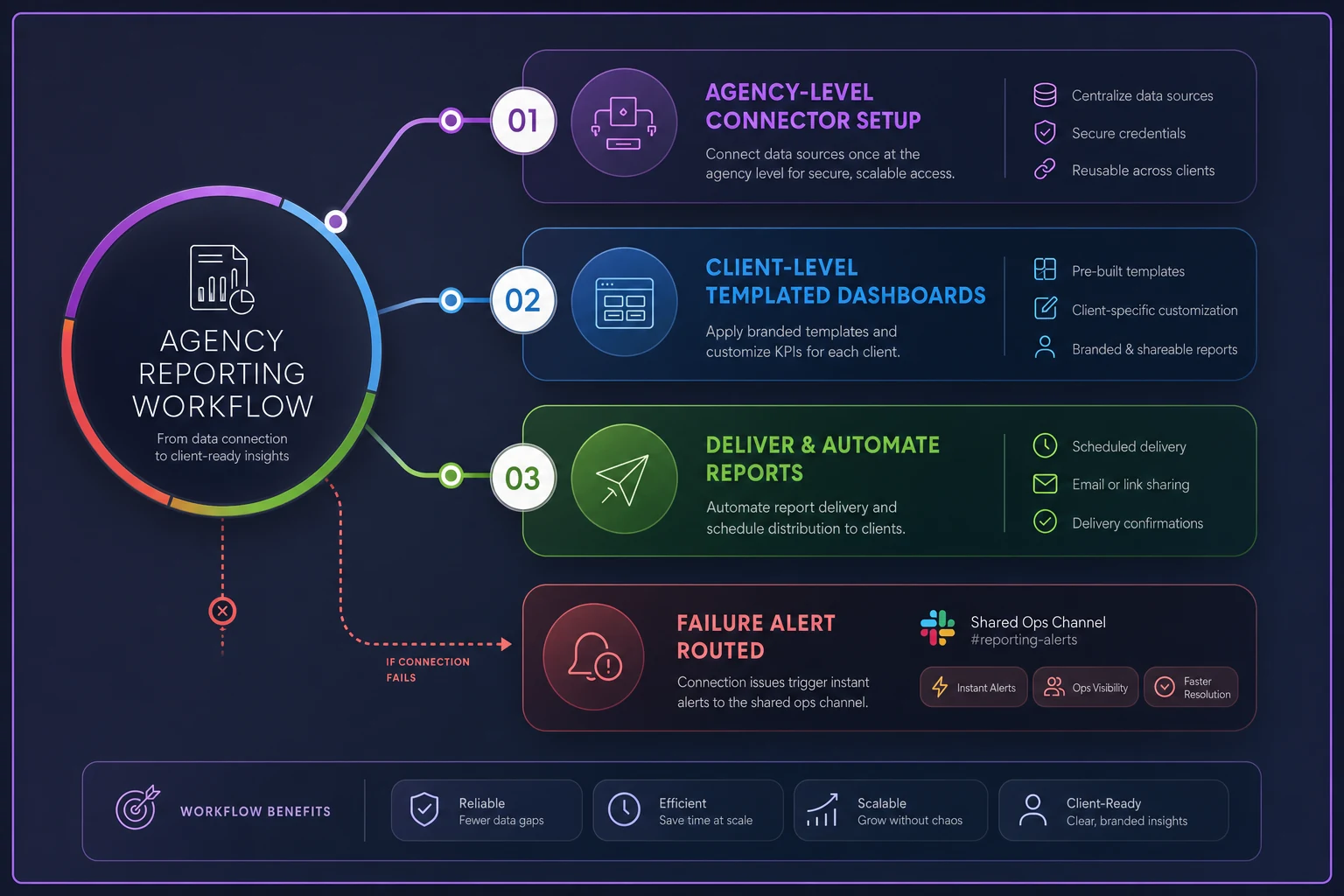
The visual maps connectors feeding into shared templates and alerts routing to ops, illustrating the separation between agency setup, client templates, and ops monitoring.
Product-selection checklist
Run every shortlisted vendor through this before committing to an annual plan:
-
[ ] Does the tier we're pricing include full white-label (custom domain, zero vendor branding)?
-
[ ] How many staff seats are included, and what's the cost of the next one?
-
[ ] Can we lock templates so non-owners populate but can't redefine metrics?
-
[ ] Are permissions granular enough to separate editors from viewers from client-portal users?
-
[ ] Is there any change/audit history, and on which tier?
-
[ ] Do connector-failure alerts route to a shared channel, not just the builder?
-
[ ] Are all our actual data sources natively supported? (List them and check each — don't assume.)
-
[ ] Can clients log into a portal, or is it PDF/email only? Which do your clients actually want?
-
[ ] What's the PDF scheduling flexibility — per-client cadence, custom send times?
-
[ ] What happens to reports if you downgrade or cancel?
If a vendor fails on template locking or seat economics, that's usually a harder no than a missing connector — connectors get added; governance gaps stay.
Security and compliance checklist
This matters more than agencies assume, because clients increasingly ask you about it during their own vendor reviews.
-
[ ] Does the vendor offer SSO (and on which tier)?
-
[ ] Is there role-based access control you can actually configure per staff member?
-
[ ] Where is client data stored and processed, and does that satisfy your clients' regional requirements?
-
[ ] Is there a DPA (Data Processing Agreement) available to sign?
-
[ ] How does the platform handle data deletion when you offboard a client — is deletion verifiable?
-
[ ] What's the credential rotation story for connected ad accounts if a staff member leaves?
-
[ ] Does the client portal expose only that client's data, with no cross-client leakage risk?
The offboarding-deletion question is the one most agencies never ask during the demo and then scramble on when a client requests their data be removed.
When each platform actually makes sense
Choose Whatagraph when your differentiation is presentation quality, you report across many channels, and you have a small, trusted team where governance-by-convention still works. Strong fit under roughly 20 clients where speed-to-polished-report matters more than locked permissions.
Choose AgencyAnalytics when you're scaling past 25 clients with multiple staff, need client-login portals, and want permission structures that survive a growing team. This is the safest default for the many-clients, many-account-managers agency.
Choose ReportGarden when you want reporting bundled with light budget and account operations, and your team already works in that combined model.
Who should not switch right now: if you're under about 10 clients, solo or two people, and your current tool works — leave it. Migrating reporting platforms mid-quarter for marginal feature gains costs more in disruption than it returns. The move makes sense when governance is actively failing you, not because a competitor's dashboard looked slightly nicer in a demo.
A short migration plan
If you've decided to move, don't cut over all clients at once. Staged is boring and it works.
-
Freeze definitions first (week 1). Before touching a new tool, write down the canonical definition of each headline KPI. Migration is the right moment to standardize the "two conversions" problem out of existence — don't carry ambiguity into the new platform.
-
Build 3 template archetypes (weeks 1–2). Most agencies have roughly three real report shapes (paid-only, full-funnel, executive summary). Build and lock those rather than rebuilding per client from scratch.
-
Pilot with 3–5 clients (weeks 2–3). Pick forgiving, engaged clients. Run parallel reporting for one cycle — old and new — so you catch metric mismatches before the client does.
-
Verify the numbers reconcile. Compare pilot reports against the old platform and the raw ad accounts. Any discrepancy gets resolved now, not in production.
-
Roll the rest in batches of roughly 10 (weeks 3–6). Assign one owner per batch. Kill the old tool only after a full clean cycle on the new one.
-
Set alerts and lock permissions last. Once dashboards are live, route connector-failure alerts to your ops channel and drop account managers to populate-only on shared templates.
The batch approach means a mistake hits five clients, not sixty. And the parallel-run cycle is the single step agencies skip and regret — it's the only point where you can catch a definition mismatch without a client watching.
The part that actually decides it
The tool comparison matters less than most agencies think, and the governance tier matters far more. Any of these three can produce a clean, branded, automated PDF. What separates a reporting stack that scales from one that quietly generates disputes is whether metric definitions are enforced, whether the right people can and can't edit the right things, and whether a broken connector alerts someone before the report ships.
Pick the tier that includes locked templates and real permissions even if it costs more than the entry plan looks like it should. Standardize your KPI definitions before you migrate. Run one parallel cycle before you trust the numbers. Do those three things and the specific logo on your dashboard becomes a detail — which is exactly what it should be.
Pick the tier that includes locked templates and real permissions even if it costs more than the entry plan looks like it should. Standardize your KPI definitions before you migrate. Run one parallel cycle before you trust the numbers. Do those three things and the specific logo on your dashboard becomes a detail — which is exactly what it should be.
Ready to elevate your agency's performance?
Join 2,000+ agencies using Digmaly to save time, boost efficiency, and deliver superior client results.