



A client emails your account lead: "We're ending the contract. Please confirm you've deleted all our data." Someone replies "Confirmed, all deleted" within the hour. Feels like a win. Except nobody actually deleted anything from the warehouse tables, the pixel logs still sit in your server-side container, three analysts have exports in their Google Drive, and the raw event data is quietly living in a BigQuery backup that auto-restores for 30 days.
Six months later that former client's compliance team sends a DSAR follow-up, or worse, a regulator asks for evidence of deletion. Now you're scrambling to figure out where the data actually went, whether it's gone, and how to prove a deletion that never really happened.
This is one of the messiest operational gaps in agencies—precisely because deletion feels simple and turns out to be anything but. The data doesn't live in one place. It's smeared across ad platforms, your warehouse, dashboards, cloud storage, email, ticketing tools, and backups, each with its own deletion behavior. A "yes we deleted it" reply that isn't backed by layer-by-layer verification isn't a resolution. It's a liability.
Why "we deleted it" is almost always wrong
Most agencies treat client data like it's a single object when it's actually dozens of copies scattered across systems that each behave differently.
When an analyst pulls campaign performance into a Looker Studio dashboard, that dashboard caches data. When they export a CSV to build a QBR deck, that file lives in Drive and probably in someone's Downloads folder too. When your measurement pipeline ingests conversion events, copies land in raw tables, staging tables, and modeled tables. Server-side tracking containers retain payloads. Your warehouse runs automatic backups. Your BI tool has extracts.
Deleting "the data" means finding and clearing every one of those copies—and knowing which ones you can't control because they belong to Meta or Google.
The pattern that trips people up: deletion in a source system does not propagate. Delete a row in your production table and the nightly backup still has it. Revoke access to an ad account and the historical exports your team already pulled are untouched. Someone assumes deleting the "main" copy handles everything, and the shadow copies quietly survive.
If your data map is fuzzy to begin with, deletion is guesswork. This is why deletion procedures depend heavily on solid data governance and data-lineage checks—you can't delete what you can't locate, and you can't prove deletion of data you never tracked.
Map deletion to storage layers first
Before writing a single deletion script, you need a layer inventory. Every client's data lives in some subset of these, and each layer has a different deletion method and a different verification method.
Eliminate marketing chaos with streamlined campaign control.
Digmaly lets you plan, execute, and track every campaign effortlessly.
- Unified campaign management
- Real-time client reporting
- Collaborative team workflows
No credit card required
| Storage layer | Where client data hides | Deletion method | Verification signal |
|---|---|---|---|
| Ad platforms (Meta, Google, TikTok) | Account access, custom audiences, uploaded lists | Remove access, delete uploaded audiences | Screenshot + API confirmation of removed audiences |
| Server-side tracking | GTM SS container logs, Conversions API payloads | Purge container logs, stop event forwarding | Log query returning zero rows for client ID |
| Data warehouse (raw) | Event tables, source-loaded tables | DELETE/DROP with client filter | Row-count query = 0 |
| Data warehouse (modeled) | Staging, marts, aggregated tables | Rerun models excluding client, delete partitions | Row-count + downstream table check |
| Backups / snapshots | Automated warehouse backups, table snapshots | Wait out retention window or force-expire | Backup manifest confirming expiry date |
| BI / dashboards | Looker Studio, Tableau extracts, cached tiles | Delete reports, clear extracts | Report list confirming removal |
| Cloud storage | GCS/S3 buckets, exported CSVs, raw dumps | Delete objects, empty versioned buckets | Object listing = empty for prefix |
| Local/team files | Drive exports, Slack uploads, email attachments | Search-and-delete, empty trash | Search returning no matches |
| Ticketing / CRM | Client data in ticket bodies, notes | Redact or delete records | Record status = deleted/redacted |
The single most-missed layer is backups. Teams delete production data, verify the row count is zero, and declare victory—while a snapshot with a 35-day retention still holds the full dataset. Deletion isn't complete until that retention window closes or you force-expire the snapshot.
Second most-missed: team files. Data governance frameworks focus on systems, but the analyst who exported a client's full conversion table into a spreadsheet to debug attribution six weeks ago is a real exposure. If your deletion playbook doesn't include a search across Drive, Slack, and email, you're only deleting the tidy half of the problem.
The deletion playbook, step by step
A deletion request should trigger a defined sequence, not an improvised scramble. Here's the operational flow that holds up under an audit.
-
Log the request as a ticket the moment it arrives. Timestamp it. Capture who requested it, what scope ("all data" vs. "PII only" vs. "audience lists"), and the contractual deadline. This ticket becomes the spine of your evidence trail.
-
Freeze the account. Before deleting anything, stop new data from flowing in. Pause pipelines ingesting that client's events, disable scheduled exports, and stop server-side forwarding. Deleting while data is still arriving is how you end up chasing your own tail.
-
Pull the layer inventory for that client. Use your data map to list exactly which layers hold their data. If you don't have a map, this step is where the deletion timeline blows up—expect days instead of hours.
-
Run deletion per layer, in dependency order. Delete modeled and downstream tables before raw sources, otherwise you risk rerunning a model that repopulates from source. Handle warehouse layers first, then storage, then BI, then team files, then ticketing.
-
Run verification queries for each layer. Every deletion needs a matching check that returns zero. A deletion without verification is a claim, not a fact.
-
Handle backups explicitly. Either force-expire snapshots or document the retention window and the date the data fully ages out. Note this on the ticket—it's the layer auditors probe hardest.
-
Address platform-side data you don't control. You can delete uploaded custom audiences and remove account access, but Meta and Google retain aggregate data on their side. Document what you deleted and clearly state what sits outside your control.
-
Compile the evidence artifact. Bundle the query results, screenshots, timestamps, and retention notes into a single record tied to the ticket.
-
Send the client confirmation after verification, not before. This is the reversal most agencies need: confirm when it's done and proven, not when someone remembers to reply.
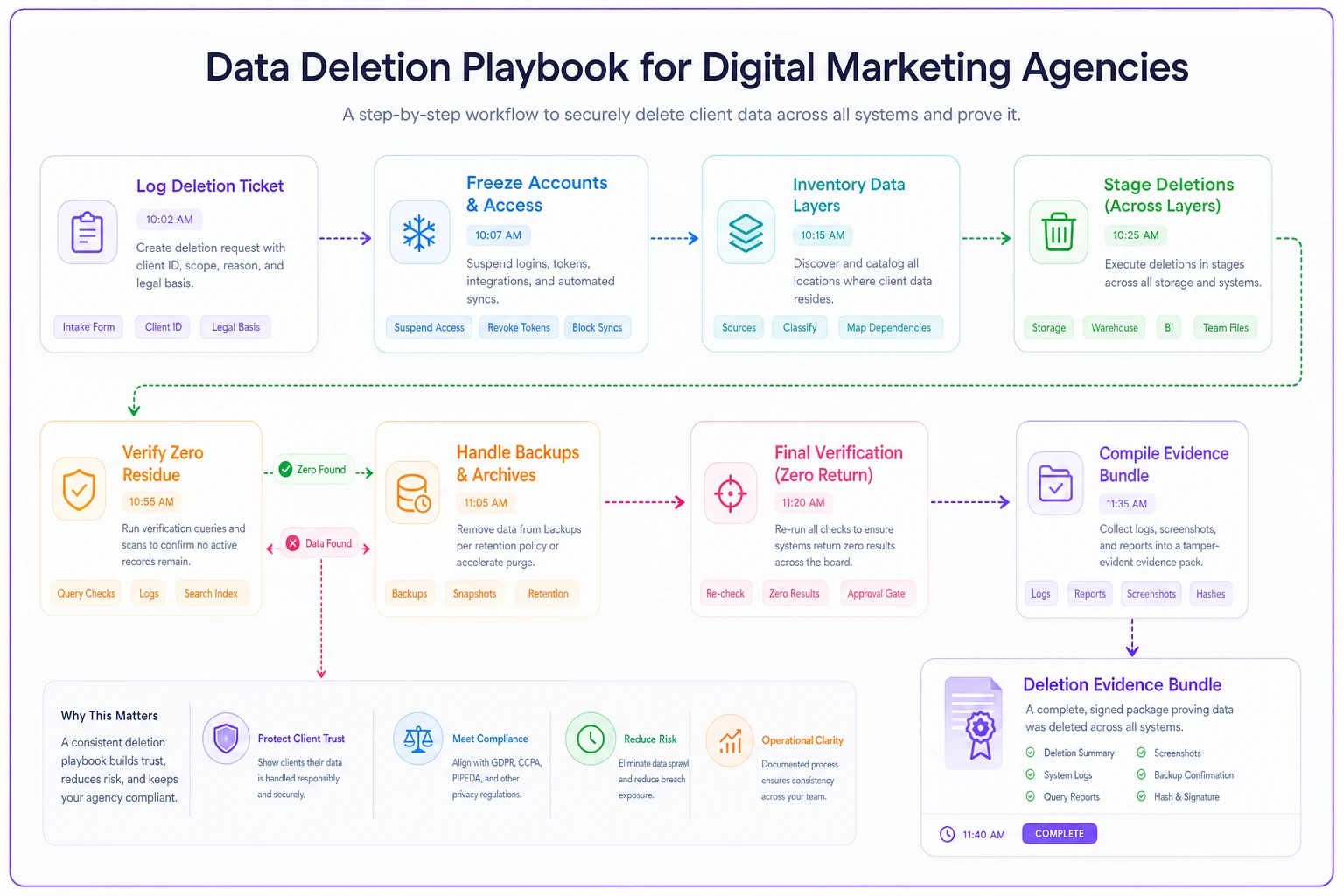
A simple flow diagram of these steps makes the operational order clear for teams executing the playbook.
Deletion scripts with built-in verification
The mistake is treating deletion and verification as two separate tasks that a busy analyst handles back-to-back—which in practice means verification gets skipped when things are hectic.
-
A
DELETEstatement filtered on the client identifier, followed immediately by aSELECT COUNT(*)on the same filter that must return 0. -
A storage-clear command followed by an object-listing command that must return empty for that prefix.
-
A container-log purge followed by a log query for that client ID that must return zero rows.
The pattern is delete → count → assert zero → capture output. That captured output—the query and its zero result with a timestamp—is your evidence. You're not generating evidence as a separate chore; the verification step is the evidence.
One detail worth noting: run verification as a different user or role than the one who ran the deletion where possible. Self-verification by the same person who did the delete is weaker evidence than an independent check. Even a lightweight second-set-of-eyes step raises the quality of your audit trail considerably.
Run verification as a read-only role distinct from the deletion actor to strengthen the audit trail.
This is also where AI-assisted operational tooling earns its place in the background. Instead of an analyst manually stitching together nine layers of queries and screenshots, a workflow platform can trigger the deletion sequence from the ticket, run each verification query automatically, flag any layer that doesn't return zero, and assemble the outputs into one record. The value isn't automation for its own sake—it's that the tedious, skippable verification steps stop getting skipped when the team is slammed.
Audit-ready evidence artifacts
Six months after a deletion, "I'm pretty sure we handled it" is worthless. What holds up is a self-contained evidence package that a regulator, a client's legal team, or your own compliance lead can read without asking a single follow-up question.
-
The original request with timestamp and scope
-
The client's layer inventory (what data existed and where)
-
Per-layer deletion commands actually run
-
Per-layer verification output showing zero results, with timestamps
-
Who executed deletion and who verified (ideally different people)
-
Backup/snapshot retention notes and the full-expiry date
-
A statement of platform-side data outside your control
-
The confirmation message sent to the client, with send timestamp
Timestamps on everything and verification output a third party can read independently—that's what separates real evidence from hand-waving. A screenshot of an empty bucket with a visible date beats "deleted from GCS" in a checklist. A query result showing count = 0 with the query visible beats "removed from warehouse."
Store these artifacts somewhere immutable and searchable, organized by client and request date. When a follow-up lands, retrieving the package should take minutes, not a two-day archaeology dig through Slack.
Client-communication templates that don't overpromise
The fast "confirmed, all deleted" reply causes real damage because it makes a factual claim you can't yet back. Two templates fix most of this.
Acknowledgment (sent immediately): > "Thanks—we've logged your deletion request as of [date/time] and started our process. We'll confirm completion with verification within [X business days per contract]. This covers data within our systems; note that ad platforms like Meta and Google retain certain aggregate data on their side, which we'll outline in our confirmation."
Completion (sent only after verification): > "Your data deletion is complete as of [date/time]. We've removed data across all applicable systems—warehouse, tracking infrastructure, reporting, storage, and internal files—and verified each. Platform-retained aggregate data outside our control is noted in the attached summary. Retention on automated backups fully expires by [date]. A verification summary is available on request."
The difference between these and a one-line "all done" is that they set an honest timeline, separate what you control from what you don't, and only make the completion claim once it's actually true and provable.
The most common self-inflicted wound is the completion message going out before the backup window closes. If a client asks on day 3 and your snapshots don't expire until day 30, "fully deleted" is false. Say deletion is complete with backup expiry by a specific date—accurate and defensible.
A real scenario
A mid-sized performance agency handling around 40 active clients lost two accounts in the same quarter, both requesting full deletion. Their old process was a Slack message to the data team and a same-day "done" email to the client.
When one of those former clients came back three months later with a formal deletion-verification request tied to their own audit, the agency had nothing. It took an analyst most of a week to reconstruct what had actually been deleted—and they found raw event tables and two BigQuery snapshots still holding the client's conversion data. The "deletion" three months earlier had cleared exactly one modeled table.
They rebuilt the process around a layer inventory and paired delete-verify scripts. On the next offboarding, the full sequence—freeze, delete across nine layers, verify each, compile evidence, document backup expiry—took roughly half a day of mostly hands-off work and produced a single evidence package. When that client's legal team asked a follow-up two months later, the answer took about ten minutes to pull instead of a week to reconstruct.
The bigger shift wasn't speed. It was that they could now say "deleted and verified" and actually mean it, with proof attached.
When rigor is worth it—and when it's overkill
Not every deletion request needs the full nine-layer treatment. Judgment matters.
Full playbook makes sense when:
-
the client held PII or hashed audience data
-
you're under GDPR/CCPA obligations
-
the contract specifies deletion terms
-
the client is in a regulated industry (finance, health, legal)
-
there's any hint of a dispute
Lighter handling is reasonable when:
-
the client's data was purely aggregate campaign metrics with no PII
-
the relationship is ending amicably
-
no contractual deletion clause exists
Who should not cut corners at all:
-
any agency touching healthcare, financial services, or children's data, and any agency that has ever had a client escalate to legal
The teams that get burned are usually the ones who assumed they were in the "lighter handling" category right up until a former client's compliance team proved otherwise.
The real fix
Deletion isn't a reply-to-email task. It's a multi-layer operational procedure with verification baked in and evidence produced as a byproduct. The agencies that handle this well aren't the ones with the fastest confirmation email—they're the ones who can, months later, hand over a timestamped record showing exactly what was deleted, from where, verified by whom, with backups accounted for.
Get your layer inventory built, pair every deletion with its verification, hold the confirmation until it's actually true, and store the evidence somewhere you can find in minutes. This same discipline extends naturally from the broader work of running a proper privacy and compliance operations framework—deletion is just the layer most agencies discover they were faking until an audit forced the truth out.
Get your layer inventory built, pair every deletion with its verification, hold the confirmation until it's actually true, and store the evidence somewhere you can find in minutes. This same discipline extends naturally from the broader work of running a proper privacy and compliance operations framework—deletion is just the layer most agencies discover they were faking until an audit forced the truth out.
Ready to elevate your agency's performance?
Join 2,000+ agencies using Digmaly to save time, boost efficiency, and deliver superior client results.