

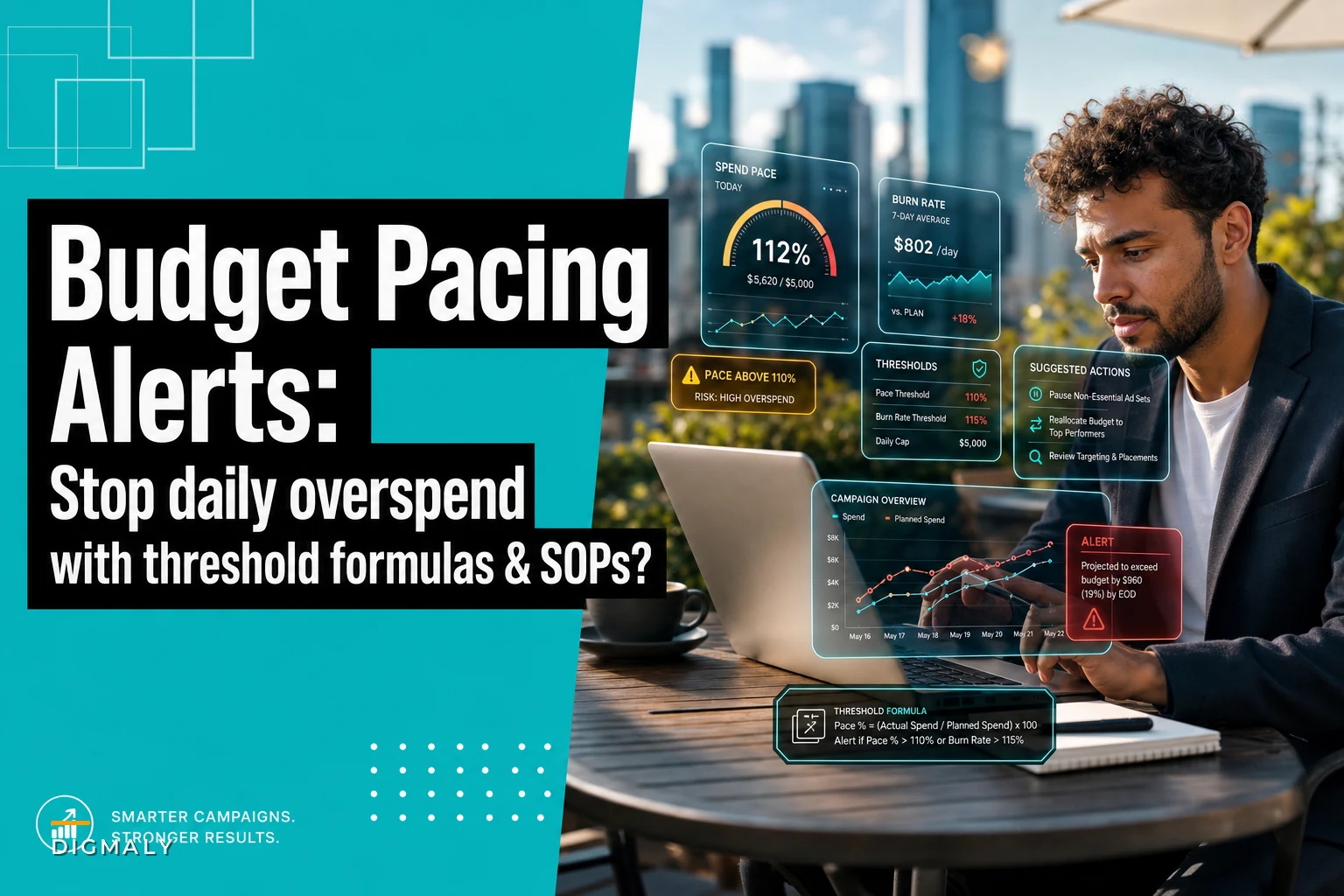

Three months ago, a performance marketing team discovered their client's entire monthly budget had vanished in 4 hours. The campaign started running at 6am. They found out during their 10am standup.
The kicker: their dashboard showed green metrics everywhere. CTR looked great. CPMs were beating benchmarks. Conversion rate held steady. But the budget pacing alerts they desperately needed? Nowhere to be found.
This happens constantly in agencies running $50k+ monthly budgets across multiple platforms. Not because teams are careless, but because standard platform notifications fail to catch the specific pacing anomalies that blow budgets. Facebook might tell you a campaign is "learning" while it burns through next week's budget. Google might show "eligible" status while your client's Q4 budget evaporates in Q3.
The gap between what platforms monitor and what actually protects budgets is massive. And that gap costs agencies both money and clients.
The pacing metrics platforms won't calculate for you
Platform dashboards track spend. They don't track spend velocity, acceleration patterns, or contextual pacing against your actual business calendar. There's a fundamental difference between knowing you've spent $5,000 and knowing you're currently burning $312 per hour when your sustainable rate is $104.
Most agencies discover pacing problems through three painful scenarios:
The morning surprise: Log in to find yesterday's "optimization" triggered a spending surge overnight. Your 2% bid increase somehow translated to 300% spend increase. The platform's explanation? "Increased opportunities to show ads to your target audience."
The friday afternoon panic: Client emails at 4:47pm asking why their budget is gone with 11 days left in the month. You check the account. Everything looks normal except that tiny detail where the daily budget mysteriously uncapped itself during Tuesday's campaign edits.
The silent acceleration: Campaign runs normally for weeks, then gradually accelerates spending over 3-4 days. By the time anyone notices the trend, you're already $8k over budget. Platform alerts? Silent, because technically nothing "errored."
These scenarios are predictable patterns that proper budget pacing alerts would catch in the first 2-4 hours, not 2-4 days later.
Core pacing KPIs that actually prevent overspend
Four specific velocity indicators protect budgets:
Eliminate marketing chaos with streamlined campaign control.
Digmaly lets you plan, execute, and track every campaign effortlessly.
- Unified campaign management
- Real-time client reporting
- Collaborative team workflows
No credit card required
| KPI | Description | Formula |
|---|---|---|
| Hourly Burn Rate (HBR) | Current spend per hour compared to sustainable spend per hour measured in rolling 2-hour windows. | (Spend in last 2 hours / 2) / (Remaining budget / Remaining hours in period) |
| Spend Acceleration Index (SAI) | Rate of spending change between time periods to catch gradual creep. | (Current 4-hour spend - Previous 4-hour spend) / Previous 4-hour spend |
| Budget Coverage Ratio (BCR) | Days of budget remaining vs days in period remaining. | (Remaining Budget / Average Daily Spend Last 7 Days) / Days Left in Period |
| Platform Spend Variance (PSV) | Compares actual platform spend against planned distribution. | Actual Platform Spend % - Planned Platform Spend % |
Hourly Burn Rate (HBR)
Current spend per hour compared to sustainable spend per hour. Not your platform's "average daily budget" divided by 24, but actual spending velocity measured in rolling 2-hour windows.
Formula: (Spend in last 2 hours / 2) / (Remaining budget / Remaining hours in period)
When this exceeds 1.5x, you have 4-6 hours before significant budget damage occurs.
Spend Acceleration Index (SAI)
Rate of spending change between time periods. This catches the gradual creep that turns into budget hemorrhaging.
Formula: (Current 4-hour spend - Previous 4-hour spend) / Previous 4-hour spend
Anything above 40% demands immediate investigation. Above 75% requires intervention.
Budget Coverage Ratio (BCR)
Days of budget remaining vs days in period remaining.
Formula: (Remaining Budget / Average Daily Spend Last 7 Days) / Days Left in Period
Below 0.8 means you're tracking toward early budget exhaustion. Below 0.6 means it's already happening.
Platform Spend Variance (PSV)
Compares actual platform spend against planned distribution. Running 70% of budget through Facebook when the plan says 40% is a problem, even if total spend looks fine.
Formula: Actual Platform Spend % - Planned Platform Spend %
Variance beyond ±15% indicates platform-specific pacing issues.
Threshold formulas calibrated to campaign types
E-commerce Black Friday campaigns have different velocity patterns than B2B lead generation. Your thresholds need calibration by campaign type:
E-commerce promotional campaigns
-
HBR threshold
2.0x during sale hours, 1.3x during normal hours
-
SAI threshold
60% acceptable during flash sales, 30% otherwise
-
BCR threshold
Can run as low as 0.5 during promotional periods
-
PSV threshold
±25% acceptable given platform performance variance
Lead generation campaigns
-
HBR threshold
1.4x maximum any time
-
SAI threshold
25% triggers review, 40% triggers pause
-
BCR threshold
Maintain above 0.85 always
-
PSV threshold
±10% maximum variance
Brand awareness campaigns
-
HBR threshold
1.6x acceptable for momentum periods
-
SAI threshold
35% acceptable for trending content
-
BCR threshold
0.75 minimum
-
PSV threshold
±20% given creative performance variables
Retargeting campaigns
-
HBR threshold
1.8x during cart abandonment windows
-
SAI threshold
50% acceptable during purchase cycles
-
BCR threshold
0.7 minimum given conversion patterns
-
PSV threshold
±30% acceptable based on audience availability
These thresholds shift based on spend level. A $100/day campaign can tolerate 2x variance that would catastrophically damage a $5,000/day campaign.
Alert-to-action SOPs that stop the bleeding
Every threshold breach needs a specific response sequence that can execute in under 10 minutes.
Yellow Alert Response (HBR at 1.5x-2.0x)
-
Pause any active bid adjustments or tests
-
Check for platform automation triggers
-
Review last 24 hours of changes
-
Set temporary campaign-level caps
-
Document in client communication log
Time to execute: 8 minutes maximum
Orange Alert Response (SAI above 40%)
-
Immediately reduce bids by 15%
-
Narrow audience targeting by 20%
-
Pause lowest performing ad sets
-
Enable platform spending limits
-
Schedule 2-hour recheck
Time to execute: 6 minutes maximum
Red Alert Response (BCR below 0.6)
-
Pause all prospecting campaigns
-
Reduce retargeting to top 20% performers
-
Implement hard daily caps at 70% of ideal pace
-
Alert client with recovery timeline
-
Create spend reallocation plan
Time to execute: 10 minutes maximum
Platform Variance Response (PSV beyond threshold)
-
Pause affected platform temporarily
-
Redistribute budget to performing platforms
-
Investigate platform-specific issues
-
Adjust future pacing expectations
-
Update cross-platform rules
Time to execute: 12 minutes maximum
Each SOP includes specific platform actions. "Reduce bids" means accessing Ads Manager > Campaign > Ad Set > Edit > Optimization and Delivery > Bid Strategy > Manual Bid > Reduce by 15%. Specificity prevents confusion during crisis moments.
Spreadsheet monitoring that runs while you sleep
Google Sheets becomes powerful for budget monitoring when properly configured. Production-ready code:
Basic Hourly Burn Monitor
function checkHourlyBurn() { var sheet = SpreadsheetApp.getActiveSheet(); var currentSpend = sheet.getRange("B2").getValue(); var twotHoursAgoSpend = sheet.getRange("B26").getValue(); var remainingBudget = sheet.getRange("D2").getValue(); var remainingHours = sheet.getRange("E2").getValue(); var hourlyBurn = (currentSpend - twoHoursAgoSpend) / 2; var sustainableRate = remainingBudget / remainingHours; var burnRatio = hourlyBurn / sustainableRate; sheet.getRange("F2").setValue(burnRatio); if (burnRatio > 1.5) { MailApp.sendEmail({ to: "team@agency.com", subject: "⚠️ Burn Rate Alert: " + burnRatio.toFixed(2) + "x normal", body: "Campaign burning at $" + hourlyBurn.toFixed(2) + "/hour. Sustainable rate is $" + sustainableRate.toFixed(2) + "/hour." }); } }
Spend Acceleration Tracker
function trackAcceleration() { var sheet = SpreadsheetApp.getActiveSheet(); var last4Hours = sheet.getRange("C2:C5").getValues(); var previous4Hours = sheet.getRange("C6:C9").getValues(); var currentPeriod = last4Hours.reduce((a, b) => a + b[0], 0); var previousPeriod = previous4Hours.reduce((a, b) => a + b[0], 0); var acceleration = ((currentPeriod - previousPeriod) / previousPeriod) * 100; sheet.getRange("G2").setValue(acceleration); if (acceleration > 40) { // Trigger integration webhook UrlFetchApp.fetch("https://hooks.slack.com/YOUR-WEBHOOK", { method: "post", payload: JSON.stringify({ text: "🔥 Spend accelerating: " + acceleration.toFixed(1) + "% increase detected" }) }); } }
Multi-Platform Variance Monitor
function checkPlatformVariance() { var sheet = SpreadsheetApp.getActiveSheet(); var platforms = { "Facebook": {actual: "H2", planned: "I2"}, "Google": {actual: "H3", planned: "I3"}, "TikTok": {actual: "H4", planned: "I4"} }; for (var platform in platforms) { var actual = sheet.getRange(platforms[platform].actual).getValue(); var planned = sheet.getRange(platforms[platform].planned).getValue(); var variance = actual - planned; if (Math.abs(variance) > 15) { Logger.log(platform + " variance: " + variance + "%"); // Add to alert queue sheet.getRange("J10").setValue( sheet.getRange("J10").getValue() + "\n" + platform + " off by " + variance + "%" ); } } }
Set these functions to run hourly via Apps Script triggers so alerts fire while your team sleeps.
Set these to run hourly through Google Apps Script triggers. They'll catch issues while your team sleeps.
Zapier and Make.com automation sequences
For agencies already running Zapier or Make.com, budget pacing protection without custom development:
Zapier Budget Guardian Flow
-
Trigger
Schedule (Every 2 hours)
-
Action
Google Sheets - Lookup Spreadsheet Row (get current metrics)
-
Filter
Only continue if Burn Rate > 1.5
-
Action
Formatter - Calculate (determine overage amount)
-
Action
Facebook Ads - Update Campaign Budget (reduce by 25%)
-
Action
Slack - Send Channel Message (alert team with details)
-
Action
Google Sheets - Update Row (log intervention)
This runs 24/7 without human intervention. Cost: about $0.40 per day in Zapier tasks.
Make.com Advanced Pacing Orchestra
Scenario Structure: ├── HTTP Module: Pull spend data from platforms ├── Tools: Calculate all 4 KPI metrics ├── Router: Split by alert level ├── Route 1 (Yellow): Log + Monitor ├── Route 2 (Orange): Adjust + Alert └── Route 3 (Red): Pause + Escalate ├── Iterator: Process each platform └── DataStore: Maintain historical patterns
Make.com handles complex multi-step logic better than Zapier. You can build intelligence that learns normal pacing patterns and adjusts thresholds accordingly.
Platform-specific quirks that break standard monitoring
Each ad platform has behaviors that sabotage budget pacing in unique ways:
Facebook's "Learning Phase" Hunger During learning phases, Facebook deliberately overspends to gather data. Your $500/day campaign might spend $1,200 on day one. This isn't a bug—it's Facebook's intended behavior. Your alerts need learning phase detection that temporarily adjusts thresholds by 2.5x for the first 72 hours of new campaigns.
Google's Timezone Shuffle Google Ads reports in the account timezone but spends in the user's timezone. A California-targeted campaign in a New York-based account creates a 3-hour reporting lag. Your monitoring needs timezone offset calculations or you'll consistently miss the first signs of overspend.
TikTok's Audience Exhaustion Acceleration TikTok aggressively front-loads spend when it finds responsive audiences. A campaign might spend 60% of daily budget in the first 4 hours, then crawl the rest of the day. Standard hourly monitoring reads this as overspend when it's actually TikTok's optimization pattern.
Amazon's Attribution Window Confusion Amazon Ads adjusts historical spend retroactively as attribution windows close. Yesterday's $1,000 spend might become $1,400 three days later. Monitoring needs dual tracking: cash-out spend (what actually left the account) and attributed spend (what Amazon will eventually claim).
Building your early warning system
The progression from reactive to proactive budget management follows predictable stages:
Stage 1: Manual Checks (Most agencies start here)
-
Morning and evening spend reviews
-
Platform notification reliance
-
Excel exports for analysis
-
React to problems after they occur
Stage 2: Basic Automation
-
Hourly automated reports
-
Simple threshold alerts
-
Spreadsheet-based monitoring
-
Catch problems within 4-8 hours
Stage 3: Intelligent Monitoring
-
Real-time KPI tracking
-
Multi-source data aggregation
-
Pattern-based alerting
-
Prevent problems before they start
Stage 4: Predictive Protection
-
AI-powered spend forecasting
-
Anomaly detection before threshold breaches
-
Automatic protective interventions
-
Problems become impossible
Moving from Stage 1 to Stage 2 takes about a week of setup. The ROI appears immediately—typically saving 8-15% of monthly budget from overspend scenarios.
Here's a simple workflow for an early warning system:
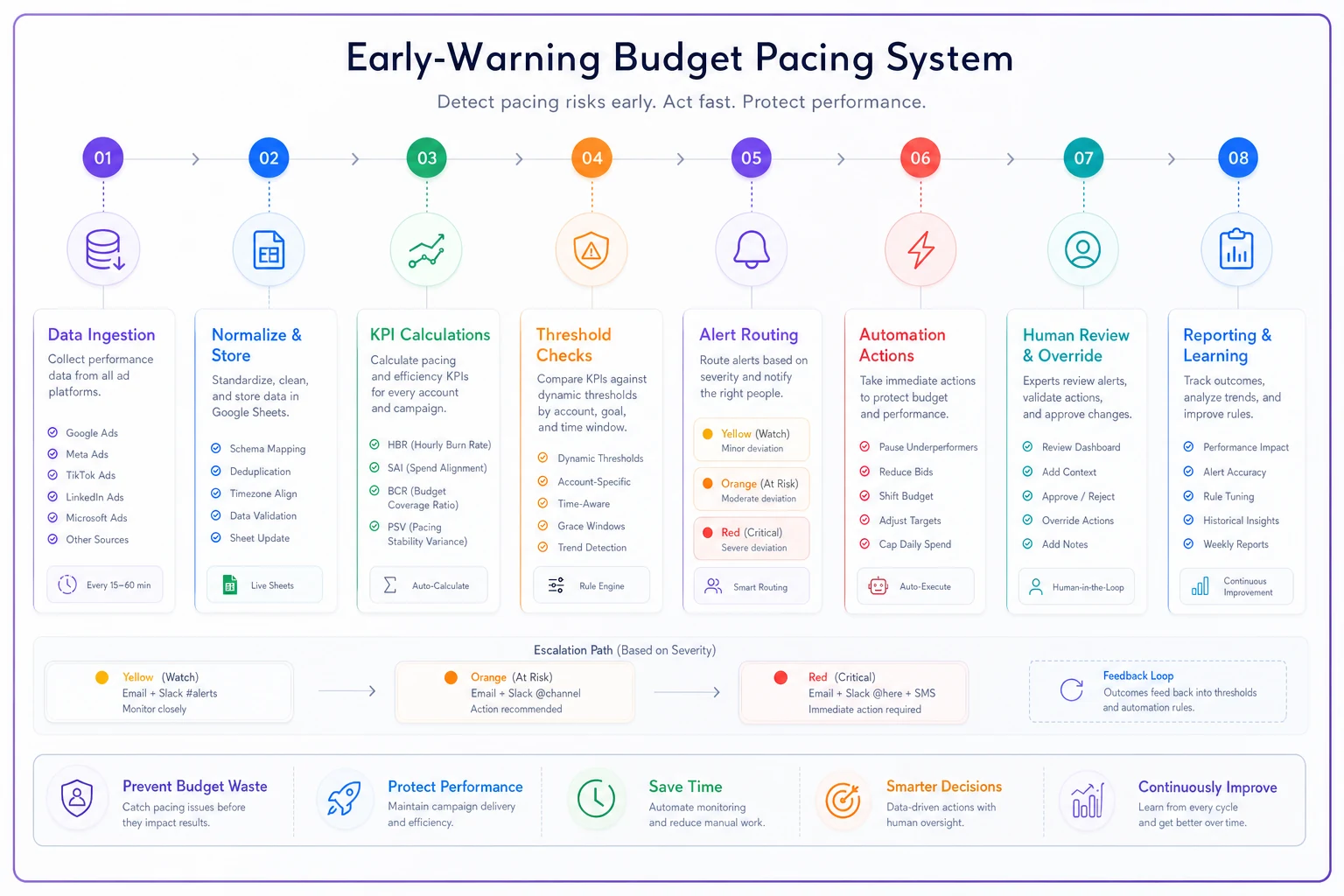
Advancing to Stage 3 requires either dedicated technical resources or operational software designed for agencies. Platforms that consolidate multi-channel data with built-in pacing intelligence transform budget protection from a daily scramble into a background process that just works.
Common objections and why they're wrong
"Platform budgets caps prevent overspend" Platform caps prevent platform overspend. They don't prevent pacing problems, acceleration issues, or cross-platform budget allocation failures. A capped campaign can still exhaust its monthly budget in 10 days.
"Daily monitoring is sufficient" By the time daily reports show problems, you've lost 12-24 hours of budget. For a $5,000/day campaign, that's potentially $10,000 of unplanned spend. Hourly monitoring catches issues while they're still correctable.
"Clients want aggressive spending" Clients want aggressive results, not aggressive waste. There's zero correlation between spending speed and campaign performance. Properly paced budgets consistently outperform burst spending by 20-35% on conversion metrics.
"This seems like overkill for smaller budgets" Smaller budgets need tighter protection. A $10k monthly budget can't absorb a $3k overspend. A $100k budget might survive it. The smaller the budget, the more critical pacing protection becomes.
The compound effect of proper pacing
Agencies that implement comprehensive budget pacing alerts see cascading improvements beyond simple overspend prevention.
Client retention improves because budget surprises disappear. Team stress decreases because morning panics stop happening. Profit margins increase because you're not eating overspend costs or issuing makegoods.
But the biggest gain is strategic. When budget pacing runs automatically in the background, your team stops playing defense and starts playing offense. Instead of checking spend every morning, they're testing new audiences. Instead of explaining overspends, they're optimizing for performance.
The shift from reactive budget management to proactive pacing control fundamentally changes how agencies operate. The difference between constantly fighting fires and actually building something.
Every day without proper budget pacing alerts is another day risking that $12k surprise. The formulas, thresholds, and SOPs above aren't theoretical—they're battle-tested across hundreds of millions in ad spend.
Implement them before your next budget surprise, not after.
Ready to elevate your agency's performance?
Join 2,000+ agencies using Digmaly to save time, boost efficiency, and deliver superior client results.